
Architecture
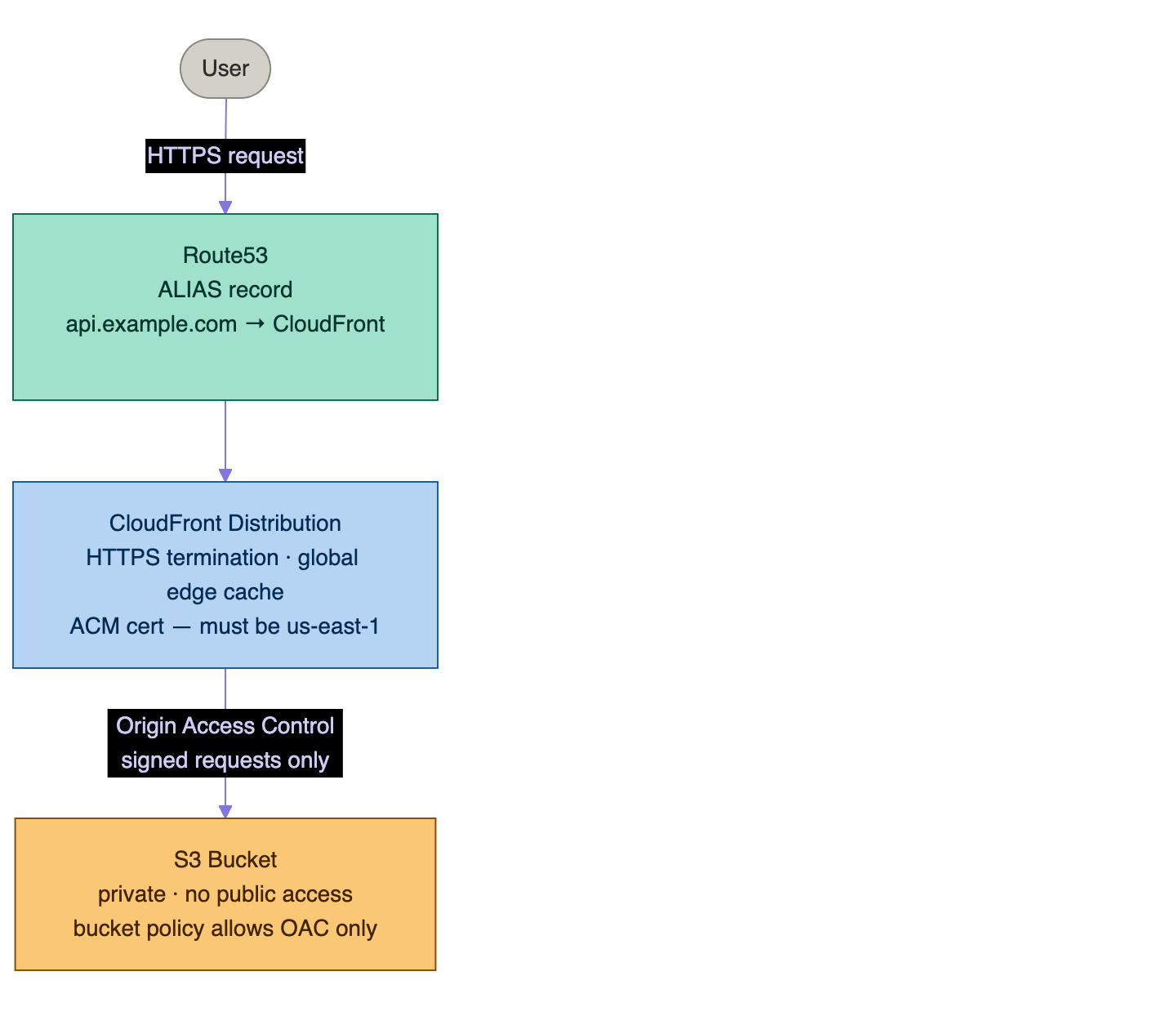
Two things to note before writing a line of HCL:
-
The S3 bucket is private. All public access is blocked. The only entity that can read from it is CloudFront, authenticated via Origin Access Control (OAC). This is more secure than the old pattern of making the bucket public and using S3 website hosting directly.
-
The ACM certificate must be in
us-east-1. CloudFront is a global service that runs fromus-east-1internally — it can only use certificates from that region regardless of where the rest of your infrastructure lives. This requires a provider alias, exactly as covered in Day 14.
The static-site Module
Module file structure
modules/
└── static-site/
    ├── versions.tf     ← required providers
    ├── variables.tf    ← inputs
    ├── main.tf         ← S3 + OAC + CloudFront
    ├── acm.tf          ← certificate (us-east-1 alias)
    ├── route53.tf      ← optional DNS record
    └── outputs.tf      ← CloudFront domain, S3 bucket name
versions.tf
# modules/static-site/versions.tf
terraform {
  required_version = ">= 1.6.0"

  required_providers {
    aws = {
      source  = "hashicorp/aws"
      version = "~> 5.0"

      # This module uses two AWS provider instances:
      # - default: the primary region (where S3 and Route53 live)
      # - us_east_1: for ACM certificates (required by CloudFront)
      configuration_aliases = [aws.us_east_1]
    }
  }
}
Declaring configuration_aliases tells Terraform that this module accepts a second provider instance. Without it, the providers argument in the module call is silently ignored.
variables.tf
# modules/static-site/variables.tf

variable "project_name" {
  description = "Short name used in resource names and tags"
  type        = string
}

variable "environment" {
  description = "Deployment environment (dev, staging, prod)"
  type        = string
}

variable "domain_name" {
  description = "Custom domain name for the site (e.g. site.mnourdine.com). Leave empty to use the CloudFront domain."
  type        = string
  default     = ""
}

variable "hosted_zone_id" {
  description = "Route53 hosted zone ID for the domain. Required if domain_name is set."
  type        = string
  default     = ""
}

variable "index_document" {
  description = "Default root object served by CloudFront"
  type        = string
  default     = "index.html"
}

variable "error_document" {
  description = "Object served on 404 errors"
  type        = string
  default     = "404.html"
}

variable "price_class" {
  description = "CloudFront price class — controls which edge locations serve content"
  type        = string
  default     = "PriceClass_100"   # US, Canada, Europe only — cheapest

  validation {
    condition     = contains(["PriceClass_100", "PriceClass_200", "PriceClass_All"], var.price_class)
    error_message = "price_class must be PriceClass_100, PriceClass_200, or PriceClass_All."
  }
}

variable "tags" {
  description = "Additional tags to apply to all resources"
  type        = map(string)
  default     = {}
}

locals {
  name_prefix = "${var.project_name}-${var.environment}"
  use_custom_domain = var.domain_name != "" && var.hosted_zone_id != ""

  common_tags = merge(var.tags, {
    Project     = var.project_name
    Environment = var.environment
    ManagedBy   = "terraform"
  })
}
main.tf — S3 bucket and CloudFront
# modules/static-site/main.tf

# ── S3 Bucket ──────────────────────────────────────────────────────────────────

resource "aws_s3_bucket" "site" {
  bucket = "${local.name_prefix}-static-site"
  tags   = local.common_tags
}

# Block all public access — content is served only through CloudFront OAC.
# This blocks PUBLIC bucket policies (e.g., Principal = "*"). It does NOT
# block service-principal policies like the OAC one below — those are
# considered private because they require AWS SigV4 signing.
resource "aws_s3_bucket_public_access_block" "site" {
  bucket = aws_s3_bucket.site.id

  block_public_acls       = true
  block_public_policy     = true
  ignore_public_acls      = true
  restrict_public_buckets = true
}

# Versioning — enables rollback if a bad deploy overwrites a file
resource "aws_s3_bucket_versioning" "site" {
  bucket = aws_s3_bucket.site.id
  versioning_configuration {
    status = "Enabled"
  }
}

# Server-side encryption at rest.
# Note: as of January 2023, S3 enables SSE-S3 (AES256) by default on all new
# buckets, so this resource is technically redundant. It is kept here to make
# the encryption choice explicit in code (and to make it easy to switch to
# SSE-KMS by adding kms_master_key_id).
resource "aws_s3_bucket_server_side_encryption_configuration" "site" {
  bucket = aws_s3_bucket.site.id
  rule {
    apply_server_side_encryption_by_default {
      sse_algorithm = "AES256"
    }
  }
}

# ── Origin Access Control (OAC) ───────────────────────────────────────────────
# OAC replaces the older OAI (Origin Access Identity) pattern.
# Why OAC won:
#   - OAI is in maintenance mode; AWS recommends OAC for all new distributions.
#   - OAC supports SSE-KMS encrypted buckets (OAI does not — OAI couldn't
#     present the SigV4 signature KMS requires for decryption).
#   - OAC works in all AWS regions, including the newer ones where OAI was
#     never enabled.
#   - OAC uses standard AWS SigV4 signing, the same auth model as the rest of
#     AWS, instead of OAI's bespoke CanonicalUser construct.

resource "aws_cloudfront_origin_access_control" "site" {
  name                              = "${local.name_prefix}-oac"
  description                       = "OAC for ${local.name_prefix} static site"
  origin_access_control_origin_type = "s3"
  signing_behavior                  = "always"
  signing_protocol                  = "sigv4"
}

# ── S3 Bucket Policy ──────────────────────────────────────────────────────────
# Allow CloudFront (specifically this distribution's OAC) to read objects.
# No other principal can read the bucket.

data "aws_iam_policy_document" "site_bucket_policy" {
  statement {
    sid    = "AllowCloudFrontOACRead"
    effect = "Allow"

    principals {
      type        = "Service"
      identifiers = ["cloudfront.amazonaws.com"]
    }

    actions   = ["s3:GetObject"]
    resources = ["${aws_s3_bucket.site.arn}/*"]

    condition {
      test     = "StringEquals"
      variable = "AWS:SourceArn"
      values   = [aws_cloudfront_distribution.site.arn]
    }
  }
}

resource "aws_s3_bucket_policy" "site" {
  bucket = aws_s3_bucket.site.id
  policy = data.aws_iam_policy_document.site_bucket_policy.json

  # No explicit depends_on needed — the policy document already references
  # aws_cloudfront_distribution.site.arn, which creates an implicit dependency
  # ordering (distribution created first, then policy attached).
}

# ── CloudFront Distribution ───────────────────────────────────────────────────

# Use the AWS-managed cache and origin-request policies via data sources rather
# than hard-coded UUIDs. This is more readable and self-documenting; the IDs
# themselves are stable, but a future reader does not have to look them up.
data "aws_cloudfront_cache_policy" "optimized" {
  name = "Managed-CachingOptimized"
}

data "aws_cloudfront_origin_request_policy" "cors_s3" {
  name = "Managed-CORS-S3Origin"
}

resource "aws_cloudfront_distribution" "site" {
  enabled             = true
  is_ipv6_enabled     = true
  default_root_object = var.index_document
  price_class         = var.price_class
  comment             = "${local.name_prefix} static site"
  tags                = local.common_tags

  # Aliases: custom domains that CloudFront responds to
  # Only set when a custom domain is configured
  aliases = local.use_custom_domain ? [var.domain_name] : []

  # Origin: the private S3 bucket, accessed via OAC
  origin {
    domain_name              = aws_s3_bucket.site.bucket_regional_domain_name
    origin_id                = "s3-${aws_s3_bucket.site.id}"
    origin_access_control_id = aws_cloudfront_origin_access_control.site.id
  }

  # Default cache behavior: serve all requests from S3
  default_cache_behavior {
    allowed_methods        = ["GET", "HEAD", "OPTIONS"]
    cached_methods         = ["GET", "HEAD"]
    target_origin_id       = "s3-${aws_s3_bucket.site.id}"
    viewer_protocol_policy = "redirect-to-https"   # HTTP → HTTPS redirect

    # Managed cache policy: CachingOptimized
    # Caches based on query strings, compresses responses, high TTL
    cache_policy_id = data.aws_cloudfront_cache_policy.optimized.id

    # Origin request policy: CORS-S3Origin
    # Passes Origin header to S3 for CORS support
    origin_request_policy_id = data.aws_cloudfront_origin_request_policy.cors_s3.id
  }

  # Custom error pages: SPA support
  # When S3 returns a 403 (object not found with OAC), serve index.html
  # This is the pattern for React/Vue/Angular single-page apps
  custom_error_response {
    error_code            = 403
    response_code         = 200
    response_page_path    = "/${var.index_document}"
    error_caching_min_ttl = 10
  }

  custom_error_response {
    error_code            = 404
    response_code         = 404
    response_page_path    = "/${var.error_document}"
    error_caching_min_ttl = 10
  }

  # Geo-restrictions: none (serve globally)
  restrictions {
    geo_restriction {
      restriction_type = "none"
    }
  }

  # TLS certificate — use ACM if custom domain, default CloudFront cert otherwise
  viewer_certificate {
    # When using a custom domain: use the ACM certificate
    # When using the CloudFront domain (*.cloudfront.net): use default cert
    acm_certificate_arn      = local.use_custom_domain ? aws_acm_certificate_validation.site[0].certificate_arn : null
    cloudfront_default_certificate = !local.use_custom_domain
    ssl_support_method       = local.use_custom_domain ? "sni-only" : null
    minimum_protocol_version = local.use_custom_domain ? "TLSv1.2_2021" : null
  }
}
acm.tf — Certificate in us-east-1
# modules/static-site/acm.tf

# ACM certificate — must be in us-east-1 for CloudFront to use it.
# The aws.us_east_1 provider alias is passed in from the root module.
# This resource is only created when a custom domain is configured.

resource "aws_acm_certificate" "site" {
  count = local.use_custom_domain ? 1 : 0

  provider          = aws.us_east_1   # REQUIRED — CloudFront only reads us-east-1 certs
  domain_name       = var.domain_name
  validation_method = "DNS"

  lifecycle {
    create_before_destroy = true   # prevents downtime when renewing
  }

  tags = local.common_tags
}

# DNS validation record — written to Route53 to prove domain ownership.
# This uses for_each over domain_validation_options so additional Subject
# Alternative Names (SANs) on the certificate get their own validation
# records automatically. The naive tolist(...)[0] pattern only validates the
# first SAN and silently breaks multi-domain certs.
resource "aws_route53_record" "cert_validation" {
  for_each = local.use_custom_domain ? {
    for dvo in aws_acm_certificate.site[0].domain_validation_options :
    dvo.domain_name => {
      name   = dvo.resource_record_name
      type   = dvo.resource_record_type
      record = dvo.resource_record_value
    }
  } : {}

  zone_id         = var.hosted_zone_id
  name            = each.value.name
  type            = each.value.type
  records         = [each.value.record]
  ttl             = 60
  allow_overwrite = true
}

# Wait for ACM to confirm the certificate is issued before using it
resource "aws_acm_certificate_validation" "site" {
  count = local.use_custom_domain ? 1 : 0

  provider                = aws.us_east_1
  certificate_arn         = aws_acm_certificate.site[0].arn
  validation_record_fqdns = [for r in aws_route53_record.cert_validation : r.fqdn]
}
route53.tf — Custom domain alias
# modules/static-site/route53.tf

# Route53 alias record pointing the custom domain to CloudFront.
# An alias record (not CNAME) is required for apex domains (mnourdine.com).
# For subdomains, either CNAME or alias works — alias is preferred.

resource "aws_route53_record" "site" {
  count = local.use_custom_domain ? 1 : 0

  zone_id = var.hosted_zone_id
  name    = var.domain_name
  type    = "A"

  alias {
    name                   = aws_cloudfront_distribution.site.domain_name
    zone_id                = aws_cloudfront_distribution.site.hosted_zone_id
    evaluate_target_health = false   # CloudFront does not support health evaluation on alias
  }
}

# IPv6 record — required when is_ipv6_enabled = true on the distribution
resource "aws_route53_record" "site_ipv6" {
  count = local.use_custom_domain ? 1 : 0

  zone_id = var.hosted_zone_id
  name    = var.domain_name
  type    = "AAAA"

  alias {
    name                   = aws_cloudfront_distribution.site.domain_name
    zone_id                = aws_cloudfront_distribution.site.hosted_zone_id
    evaluate_target_health = false
  }
}
outputs.tf
# modules/static-site/outputs.tf

output "cloudfront_domain" {
  description = "CloudFront distribution domain name (always available)"
  value       = aws_cloudfront_distribution.site.domain_name
}

output "cloudfront_distribution_id" {
  description = "CloudFront distribution ID — required for cache invalidation"
  value       = aws_cloudfront_distribution.site.id
}

output "s3_bucket_name" {
  description = "S3 bucket name — used for file uploads"
  value       = aws_s3_bucket.site.id
}

output "s3_bucket_arn" {
  description = "S3 bucket ARN"
  value       = aws_s3_bucket.site.arn
}

output "site_url" {
  description = "The URL to access the site (custom domain if configured, otherwise CloudFront)"
  value       = local.use_custom_domain ? "https://${var.domain_name}" : "https://${aws_cloudfront_distribution.site.domain_name}"
}
ACM Certificate — The us-east-1 Requirement
This is the most common reason a CloudFront deployment fails with a confusing error. CloudFront is a global service that runs from AWS's us-east-1 infrastructure internally. It can only use ACM certificates that were issued in us-east-1 — regardless of which region the rest of your Terraform config targets.
If you create the certificate in eu-west-1 and try to attach it to a CloudFront distribution, you get:
Error: Error modifying CloudFront Distribution: InvalidViewerCertificate:
The specified SSL certificate doesn't exist, isn't in us-east-1 region,
isn't valid, or doesn't include a valid certificate chain.
The fix — established in Day 14 — is a provider alias:
# root/main.tf

# Primary region — where S3, Route53, and other resources live
provider "aws" {
  region = "eu-west-1"
}

# Dedicated us-east-1 provider for CloudFront ACM certificates
provider "aws" {
  alias  = "us_east_1"
  region = "us-east-1"
}
The module receives both providers via the providers argument.
Root Configuration
# environments/prod/main.tf

terraform {
  required_version = ">= 1.6.0"

  required_providers {
    aws = {
      source  = "hashicorp/aws"
      version = "~> 5.0"
    }
  }

  backend "s3" {
    bucket         = "mnourdine-tf-state"
    key            = "prod/static-site/terraform.tfstate"
    region         = "us-east-1"
    dynamodb_table = "terraform-locks"
    encrypt        = true
  }
}

provider "aws" {
  region = "us-east-1"
}

# Required for ACM certificates used by CloudFront
provider "aws" {
  alias  = "us_east_1"
  region = "us-east-1"
}
# Note: if your primary region is already us-east-1, both providers
# point to the same region — that is fine. The alias is still required
# because the module declares configuration_aliases = [aws.us_east_1].

# ── Data sources ──────────────────────────────────────────────────────────────

data "aws_route53_zone" "main" {
  name         = "mnourdine.com"
  private_zone = false
}

# ── Module call ───────────────────────────────────────────────────────────────

module "static_site" {
  source = "../../modules/static-site"

  # Pass both provider instances — the module needs both
  providers = {
    aws           = aws
    aws.us_east_1 = aws.us_east_1
  }

  project_name   = "mohamednourdine"
  environment    = "prod"
  domain_name    = "site.mnourdine.com"
  hosted_zone_id = data.aws_route53_zone.main.zone_id
  price_class    = "PriceClass_100"

  tags = {
    CostCenter = "marketing"
  }
}

# ── Outputs ───────────────────────────────────────────────────────────────────

output "site_url" {
  value = module.static_site.site_url
}

output "s3_bucket" {
  value = module.static_site.s3_bucket_name
}

output "cloudfront_id" {
  value = module.static_site.cloudfront_distribution_id
}
Uploading Content and Deploying
What terraform apply actually does
The order matters when debugging — if the apply appears stuck, this list tells you which step is taking time:
- S3 bucket created (instant)
- Public access block, versioning, encryption applied (instant)
- OAC created (instant)
- ACM certificate requested in
us-east-1(instant; statusPENDING_VALIDATION) - Route53 DNS validation records written (instant)
aws_acm_certificate_validationwaits — typically 1–2 minutes for DNS to propagate and AWS to issue the cert; can take up to 30 minutes- CloudFront distribution created (instant in API; status becomes
In Progress) - S3 bucket policy attached referencing the distribution ARN (instant)
- Route53 alias records (A and AAAA) written for the custom domain (instant)
- CloudFront global propagation — 10–15 minutes; the distribution returns 503 until status is
Deployed
Steps 6 and 10 are where the apply spends almost all of its wall-clock time. Both are AWS-side waits, not Terraform doing work.
Initial deployment
# Initialize and apply — this takes 10–15 minutes on first run
# CloudFront distributions take time to propagate globally
terraform init
terraform validate
terraform plan
terraform apply

# Get the outputs
terraform output site_url
# → https://site.mnourdine.com

terraform output s3_bucket
# → mohamednourdine-prod-static-site

terraform output cloudfront_id
# → E1ABC2DEFGHI34J
Uploading files to S3
Terraform manages the infrastructure (bucket, distribution, DNS) but not the content. Use the AWS CLI to sync files:
# Sync the local build directory to S3
# --delete removes files in S3 that no longer exist locally
aws s3 sync ./dist/ s3://$(terraform output -raw s3_bucket)/ --delete

# Set correct content types (S3 auto-detects most, but HTML needs explicit cache headers)
aws s3 cp ./dist/index.html s3://$(terraform output -raw s3_bucket)/index.html \
  --content-type "text/html" \
  --cache-control "no-cache, no-store, must-revalidate"

# JS and CSS can be cached aggressively if filenames include hashes
aws s3 cp ./dist/assets/ s3://$(terraform output -raw s3_bucket)/assets/ \
  --recursive \
  --cache-control "public, max-age=31536000, immutable"
Invalidating the CloudFront cache
After uploading new files, CloudFront edge locations may still serve cached versions. Force a cache invalidation:
DISTRIBUTION_ID=$(terraform output -raw cloudfront_id)

# Invalidate all objects (/* matches everything)
aws cloudfront create-invalidation \
  --distribution-id $DISTRIBUTION_ID \
  --paths "/*"

# Or invalidate only specific paths (cheaper — AWS bills $0.005 per invalidation
# path beyond the first 1,000 paths per month, so /* on a large site can add up)
aws cloudfront create-invalidation \
  --distribution-id $DISTRIBUTION_ID \
  --paths "/index.html" "/assets/main.js"
Putting it in a deployment script
#!/bin/bash
# deploy.sh — build, upload, invalidate

set -e

BUCKET=$(terraform -chdir=environments/prod output -raw s3_bucket)
DISTRIBUTION=$(terraform -chdir=environments/prod output -raw cloudfront_id)

# Build the static site
npm run build

# Upload to S3
aws s3 sync ./dist/ "s3://$BUCKET/" --delete \
  --exclude "*.html" \
  --cache-control "public, max-age=31536000, immutable"

# Upload HTML with no-cache (always serve fresh HTML)
aws s3 sync ./dist/ "s3://$BUCKET/" \
  --exclude "*" --include "*.html" \
  --cache-control "no-cache, no-store, must-revalidate"

# Invalidate CloudFront cache
aws cloudfront create-invalidation \
  --distribution-id "$DISTRIBUTION" \
  --paths "/*"

echo "Deployed to $(terraform -chdir=environments/prod output -raw site_url)"
Wiring into GitHub Actions
# .github/workflows/deploy-site.yml
on:
  push:
    branches: [main]
    paths:
      - "src/**"
      - "public/**"

jobs:
  deploy:
    runs-on: ubuntu-latest
    permissions:
      id-token: write
      contents: read
    steps:
      - uses: actions/checkout@v4

      - name: Configure AWS credentials
        uses: aws-actions/configure-aws-credentials@v4
        with:
          role-to-assume: arn:aws:iam::${{ secrets.AWS_ACCOUNT_ID }}:role/GitHubActionsRole
          aws-region: us-east-1

      - name: Install dependencies and build
        run: npm ci && npm run build

      - name: Sync to S3
        run: |
          aws s3 sync ./dist/ s3://${{ secrets.S3_BUCKET }}/ --delete \
            --exclude "*.html" \
            --cache-control "public, max-age=31536000, immutable"
          aws s3 cp ./dist/index.html s3://${{ secrets.S3_BUCKET }}/index.html \
            --cache-control "no-cache, no-store, must-revalidate"

      - name: Invalidate CloudFront
        run: |
          aws cloudfront create-invalidation \
            --distribution-id ${{ secrets.CLOUDFRONT_ID }} \
            --paths "/*"
Gotchas
CloudFront takes 10–15 minutes to deploy. After terraform apply, the distribution status shows In Progress. The site_url output resolves to a real URL immediately, but requests return 503 until the distribution is fully deployed. Check status with:
aws cloudfront get-distribution \
  --id $(terraform output -raw cloudfront_id) \
  --query 'Distribution.Status'
# → "InProgress" then "Deployed"
OAC vs OAI — do not mix them. The old pattern used Origin Access Identity (OAI): a CloudFront identity that was added to the bucket ACL. OAI is deprecated in favor of OAC. Do not mix the two — if you have an existing distribution using OAI, migrate entirely to OAC before removing OAI. The bucket policy syntax differs between the two.
S3 bucket name must be globally unique. The bucket name ${local.name_prefix}-static-site is only unique if project_name + environment is unique across all AWS accounts. For extra safety, append a random suffix:
resource "random_id" "bucket_suffix" {
  byte_length = 4
}

resource "aws_s3_bucket" "site" {
  bucket = "${local.name_prefix}-static-site-${random_id.bucket_suffix.hex}"
}
SPA routing with CloudFront. Single-page apps (React, Vue, Angular) handle routing in the browser. If a user navigates directly to site.mnourdine.com/about, CloudFront requests /about from S3 — which does not exist. With OAC, the bucket policy grants s3:GetObject only (not s3:ListBucket), so S3 cannot distinguish 'object missing' from 'access denied' and returns 403 for both. The custom error response in the module maps 403 → 200 with index.html, letting the SPA's router handle the path. For non-SPA sites with real server-side routing, remove the 403 error response (or grant s3:ListBucket to OAC and switch the mapping to 404, but the 403 pattern is the AWS-recommended approach).
ACM validation can take up to 30 minutes. After terraform apply creates the aws_acm_certificate resource, AWS needs to verify DNS ownership before issuing the certificate. The aws_acm_certificate_validation resource waits for this — which means terraform apply may appear stuck for up to 30 minutes on the first deploy. This is expected.
CloudFront aliases must match the certificate. If domain_name = "site.mnourdine.com" but the ACM certificate covers only mnourdine.com (not *.mnourdine.com), CloudFront rejects the configuration. The certificate must cover the exact domain names listed in aliases.
evaluate_target_health = false on CloudFront alias records. CloudFront distributions do not support Route53 health evaluation — Route53 cannot check if a CloudFront distribution is healthy in the same way it checks EC2 or ELB targets. Always set this to false.
terraform destroy on CloudFront takes 15–30 minutes. A CloudFront distribution must be disabled and the disable change must propagate to all edge locations (15–30 minutes) before AWS allows it to be deleted. terraform destroy initiates the disable, then polls until status is Deployed, then issues the delete — so the destroy command will appear stuck for the entire propagation window. This is normal. If you cancel the destroy partway, the distribution is left in a disabled-but-not-deleted state; re-run terraform destroy and it picks up where it left off.
Cost Expectations
A small static site on this stack is genuinely under $1/month in most cases:
| Resource | Monthly cost (small site) |
|---|---|
| S3 storage (1 GB) | ~$0.023 |
| S3 requests (10k GET) | ~$0.004 |
| CloudFront data transfer | Free up to 1 TB/month (perpetual free tier as of late 2021) |
| CloudFront requests | Free up to 10M HTTP/HTTPS requests/month |
| ACM certificate | Free (always free for ACM-issued certs used with CloudFront/ALB) |
| Route53 hosted zone | $0.50/month per zone |
| Route53 queries | $0.40 per million queries |
| CloudFront invalidations | First 1,000 paths/month free, then $0.005/path |
The two costs to watch as the site grows: Route53 query volume (cheap but unbounded) and CloudFront data transfer once you exceed 1 TB/month. For a marketing site or documentation portal, the bill is dominated by the $0.50 hosted zone.
Where I Am At
The static site infrastructure is production-grade: private S3 bucket with OAC, HTTPS enforced via ACM, global CDN with CloudFront, optional custom domain via Route53. The module accepts the same providers pattern from Day 14, uses the same naming convention from Day 11, stores state in S3 with DynamoDB locking from Day 9, and deploys via GitHub Actions using OIDC from Day 16.
The pattern here — a module that encapsulates all the resources for one concern, with clean inputs and outputs, versioned in git — is the same pattern used throughout the series. The static site is a different workload from the FastAPI app, but the Terraform approach is identical.
Next: the private networking module that has been deferred since Day 16. VPC, subnets, NAT Gateway — the foundation that every other module in the stack needs but has been using the default VPC as a stand-in.
This post is part of a 30-day Terraform learning journey.



💬 Comments
No comments yet. Be the first to share your thoughts!
Leave a Comment