
Examples are fictional: AWS account
123456789012, GitHub repoacme-corp/laravel-app, domainapp.example.com, project slugmyapp. Adapt names to your org. No production secrets appear in this article.
Companion deep dive: Article #1 — Deploying Laravel to EC2 without SSH keys (OIDC, ECR, and SSM in detail).
Where this ends up
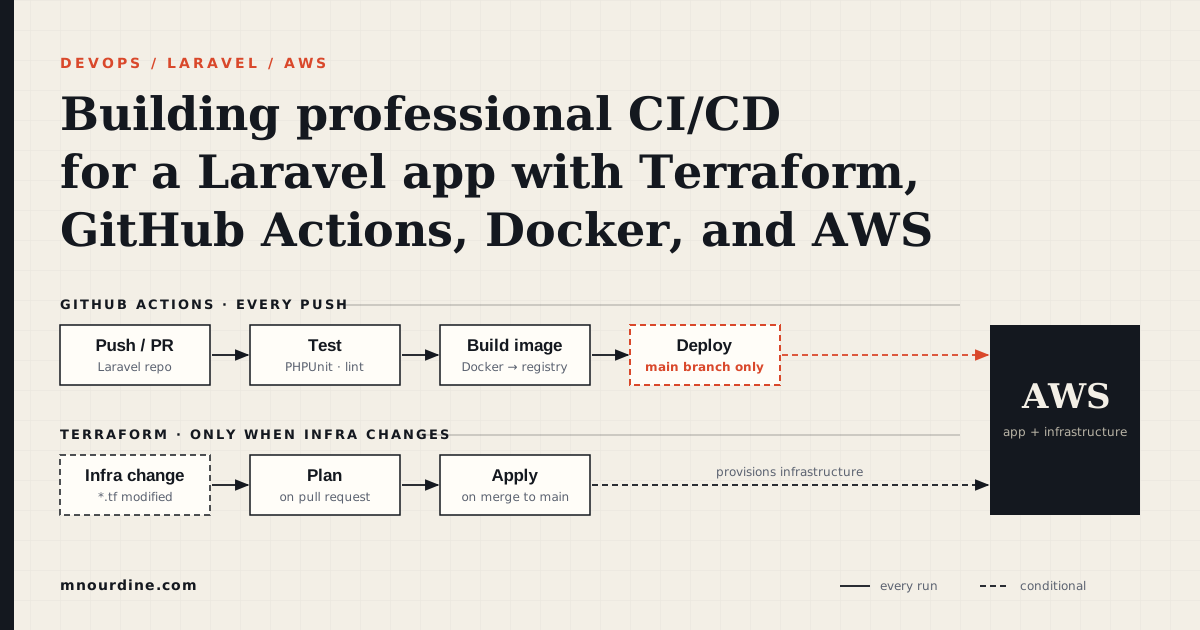
By the time you finish, Terraform will own the AWS footprint — VPC, a single Graviton EC2 instance with an Elastic IP, ECR, S3 for uploads and backups, IAM for both the instance and GitHub OIDC, and optionally a Route 53 record. On that host, Docker Compose runs nginx, PHP-FPM, a Horizon worker, the scheduler, MySQL, and Redis.
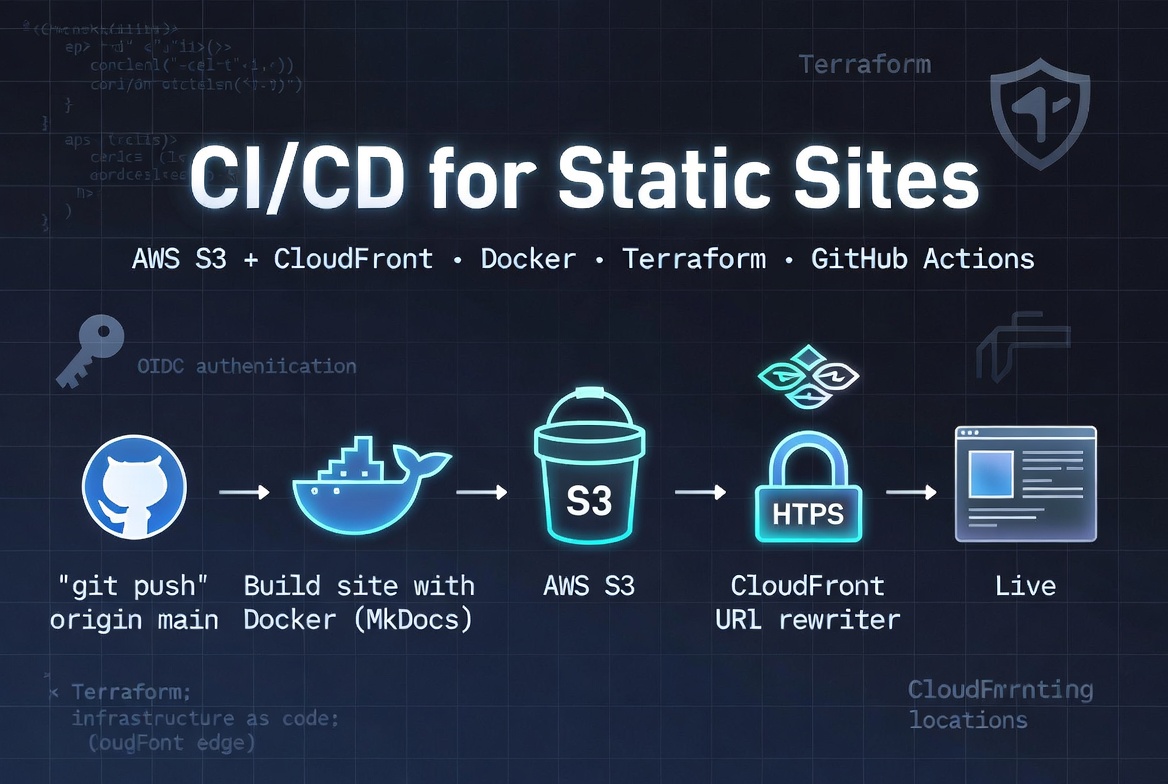
You will deploy once by hand from your laptop (build-push-ecr.sh and deploy-app.sh), then wire GitHub Actions so every merge to main runs PHPUnit, builds an arm64 image, and rolls it out through SSM — no SSH keys stored in CI. HTTPS comes from Let's Encrypt on nginx and renews on its own.
Stack: Laravel 13 · PHP 8.3 · MySQL 8 · Redis 7 · Horizon · GitHub Actions · Terraform ≥ 1.5.
Table of contents
- Architecture and why this shape
- Handling application load
- Prerequisites
- Files you need in the repo
- Run the tests locally first
- Configure the AWS CLI
- Bootstrap remote state and S3
- Provision the platform with Terraform
- Prepare the production environment file
- First deploy by hand
- Point DNS at the server
- Enable HTTPS
- Wire up GitHub Actions
- When automation takes over
- How deploy works (so you can debug it)
- Security architecture — is this configuration secure?
- Day-2 operations
- What we skipped and why
- What this stack costs (and what we avoid paying for)
- Troubleshooting
- Series map
- Takeaways
- What could be done better
1. Architecture and why this shape
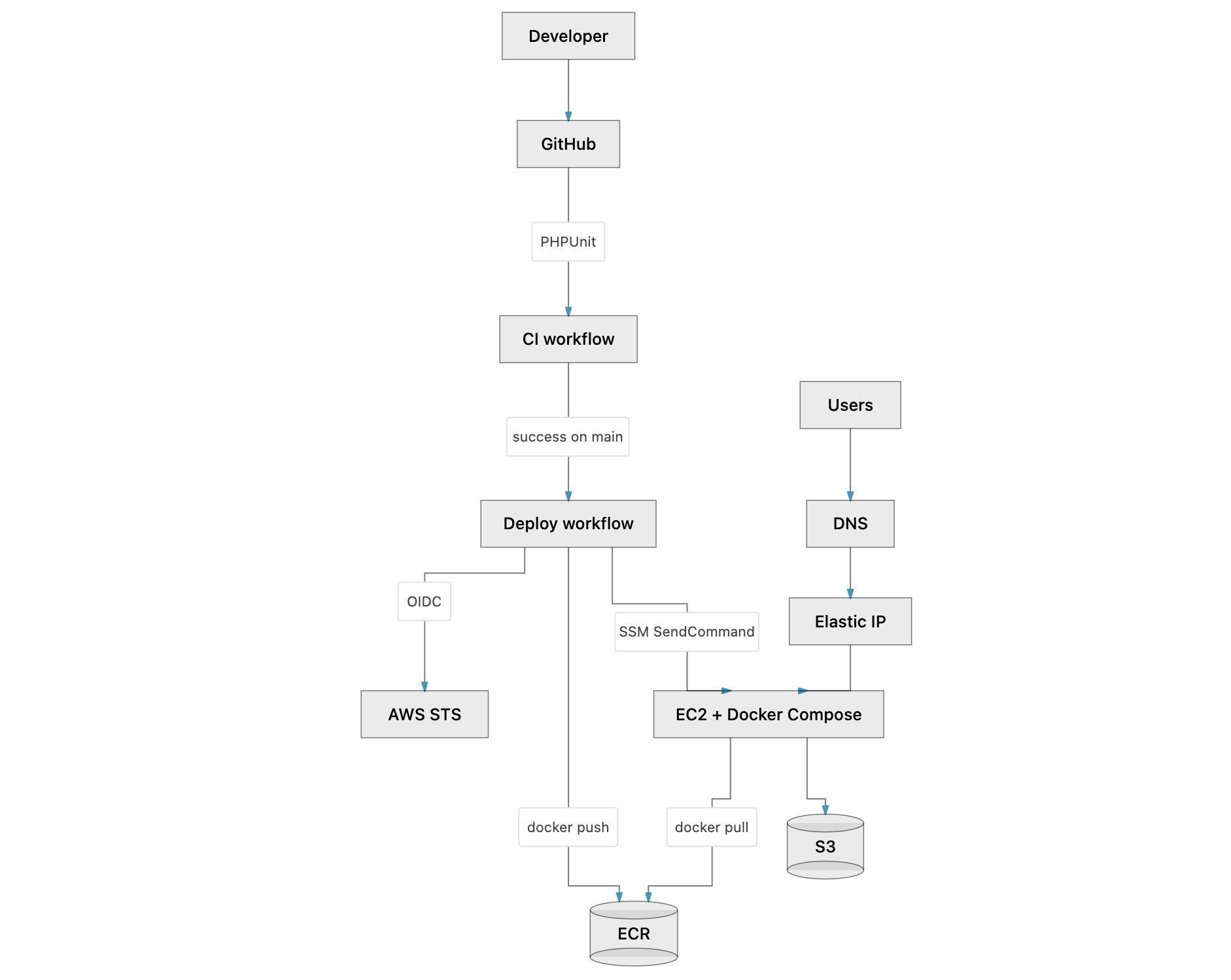
| Component | Role |
|---|---|
| Terraform | Provisions infra once; not run on every app merge |
| ECR | Stores immutable Docker images tagged by git SHA |
| EC2 + Compose | Runs nginx, app, worker, scheduler, MySQL, Redis on one host |
| SSM Run Command | Applies deploy scripts without SSH from CI |
| GitHub OIDC | Short-lived AWS credentials — no static keys in GitHub |
| S3 | User uploads (presigned URLs) + DB backups + Terraform state |
Why not ECS, RDS, or a NAT Gateway?
| Alternative | Why we skipped it |
|---|---|
| ECS/Fargate | One EC2 + Compose matches a small team and seasonal traffic; less moving parts. |
| RDS + ElastiCache | MySQL/Redis in Compose keeps cost and ops simple; S3 backups cover acceptable RPO for this scale. |
| NAT Gateway | EC2 sits in a public subnet with Elastic IP; outbound traffic uses the Internet Gateway (~$35/mo saved). MySQL/Redis have no host ports — only nginx exposes 80/443. |
| ALB + ACM | nginx terminates TLS with Let's Encrypt on the box — fine for a single server. |
| SSH deploy from CI | Keys in GitHub rot poorly; SSM gives IAM-audited remote exec. |
The four change speeds (keep these separate)
| Layer | Changes when… | Tooling |
|---|---|---|
| Foundation | New bucket, bigger instance, DNS | terraform apply |
| Host runtime | First boot | EC2 user-data |
| App release | Every merge to main |
ECR + SSM + deploy-app.sh |
| Pipeline | New checks, workflow tweaks | .github/workflows/ |
Rule: Application PRs never run terraform apply.
2. Handling application load
This architecture does not auto-scale to N application servers behind a load balancer. Load is managed by (1) keeping web requests fast, (2) pushing slow work to Redis queues, (3) scaling the single EC2 instance vertically before traffic peaks, and (4) offloading file bytes to S3.
Understanding this upfront avoids expecting Kubernetes-style horizontal scaling from a Compose-on-one-box setup.
Capacity model in one sentence
One Graviton EC2 runs every container; nginx + PHP-FPM answer HTTP quickly; Horizon workers drain Redis queues; MySQL and Redis stay on the same host; traffic spikes are handled by a bigger instance and more worker processes — not by adding a second server.
Terraform keeps the Auto Scaling Group at min = max = desired = 1, since a second app server would need its own database story (more on that below) before it's actually useful.
Two paths: synchronous web vs asynchronous jobs
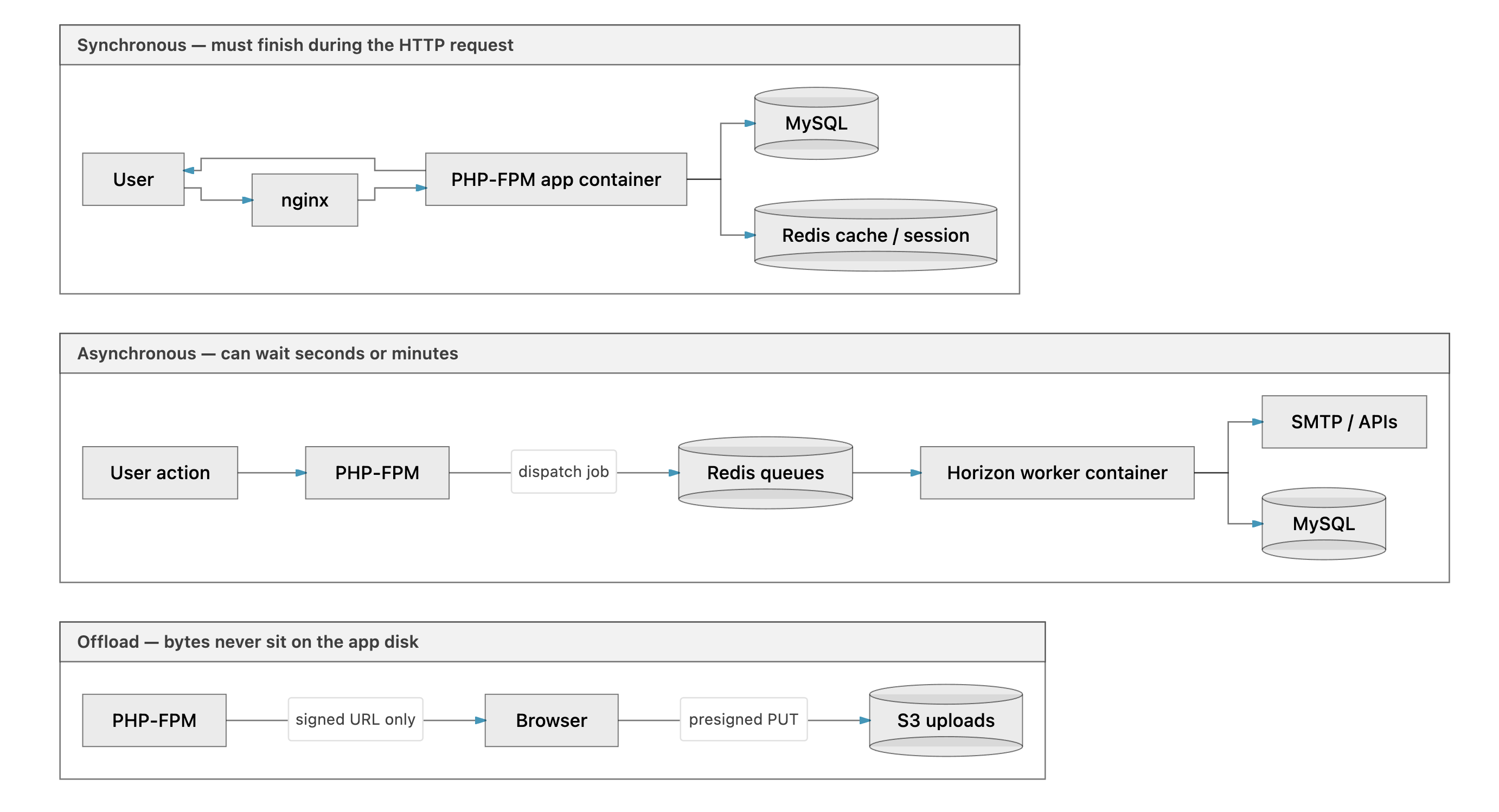
| Path | Examples | Why it matters under load |
|---|---|---|
| Synchronous | Livewire wizard steps, login, form validation, listing pages | Competes for PHP-FPM workers and CPU on the app container. Keep these queries lean; cache where possible. |
| Asynchronous | Transactional email, bulk notifications, heavy report generation, webhook retries | User gets a fast HTTP response; work happens in the worker container. This is the main relief valve. |
| S3 direct upload | Document uploads via presigned URLs | Large files go browser → S3, not through PHP memory/disk. nginx allows up to 100M for anything that still hits the app. |
Queues aren't optional here. Without Redis and Horizon, every email and background task would block a PHP-FPM worker during an HTTP request, so during a deadline-day spike the site would feel frozen even if CPU usage looked fine.
What each container does when traffic rises
| Container | Process | Under load |
|---|---|---|
| nginx | Reverse proxy, TLS, static assets | Terminates SSL; serves Vite assets from shared volume; forwards PHP to FPM. First line of defense — cheap compared to PHP. |
| app | php-fpm |
Handles all web requests (including Livewire round-trips). Bottleneck #1 for concurrent users. |
| worker | php artisan horizon |
Pulls jobs from Redis; scales worker processes inside this one container via Horizon config. Bottleneck #2 for email/notification backlogs. |
| scheduler | php artisan schedule:work |
Runs scheduled commands (backups, cleanup). Isolated so cron work does not steal FPM workers. |
| mysql | Database | All reads/writes on one EBS-backed volume. Bottleneck #3 for heavy reporting or missing indexes. |
| redis | Cache, sessions, queues | Capped at 512 MB with allkeys-lru eviction — under extreme memory pressure, cache entries drop before the process crashes. |
All containers share one EC2 instance’s CPU and RAM. Docker limits are not the primary isolation mechanism here — instance size is.
Redis: cache, sessions, and queues on one service
Production .env typically sets:
SESSION_DRIVER=redis
CACHE_STORE=redis
QUEUE_CONNECTION=redis
We run a single Redis instance to keep moving parts down on one host, so Horizon listens on the same Redis instance that also holds sessions and cache rather than a separate service to operate.
The maxmemory 512mb cap with LRU eviction stops Redis from eating all the RAM on a t4g.small. When memory fills up, the least-recently-used keys get evicted first, which is usually cache rather than active queue payloads — though it's worth watching queue latency in Horizon if evictions start spiking.
Horizon: how background work scales
The worker container runs Laravel Horizon (not a raw queue:work loop). Relevant production settings in private .env:
QUEUE_CONNECTION=redis
QUEUE_WORK_QUEUES=high,default,emails,low
HORIZON_MAX_PROCESSES=10
HORIZON_FAST_TERMINATION=true
In config/horizon.php, the production supervisor uses:
balance→autowithautoScalingStrategy→time— Horizon adds/removes worker processes based on queue wait time, up toHORIZON_MAX_PROCESSES.- Queue order left → right —
highjobs run beforelow(bulk campaigns sit onlowso they do not starve transactional mail).
| Setting | Off-season example | Peak-traffic example | Why |
|---|---|---|---|
HORIZON_MAX_PROCESSES |
3 |
10 |
Caps parallel PHP worker processes on the one EC2 box. Raise before deadlines; lower after to save RAM. |
ec2_instance_type |
t4g.small (2 vCPU, 2 GiB) |
t4g.medium (2 vCPU, 4 GiB) |
More RAM for MySQL buffer pool, Redis, and Horizon processes. |
ec2_root_volume_gb |
50 |
80 |
MySQL data and Docker volumes grow with uploads metadata and logs. |
After changing HORIZON_MAX_PROCESSES, redeploy or restart the worker container since Horizon reads this value from the environment at boot.
Running 50 Horizon processes sounds appealing until you remember they share CPU and memory with PHP-FPM and MySQL on the same box. Over-provisioning workers actually slows down web requests, so the right move is tuning from Horizon's own metrics rather than guessing at a big number.
PHP runtime optimizations (web container)
Production image enables OPcache with validate_timestamps=0 — bytecode stays in memory; deploy restarts containers to pick up code changes. Typical php.prod.ini limits: memory_limit=256M, max_execution_time=60 for web requests (queue jobs use separate timeout env vars).
Enabling OPcache on a single server cuts CPU per request substantially, since many users are hitting the same Laravel and Livewire code paths during a traffic spike, and there's no benefit to recompiling that bytecode on every request.
Seasonal vertical scaling (what we do before a deadline)
Traffic is often seasonal (quiet most of the year, spike before a submission deadline). The playbook:
1. Bump EC2 in Terraform (deployment/terraform/environments/production/terraform.tfvars):
ec2_instance_type  = "t4g.medium"   # was t4g.small
ec2_root_volume_gb = 80             # was 50
# Keep asg_min_size / max_size / desired_capacity = 1
cd deployment/terraform/environments/production
terraform apply
# EC2 may replace the instance — verify SSM, redeploy app if needed
2. Raise Horizon cap in .env.production.aws, update GitHub secret, redeploy:
HORIZON_MAX_PROCESSES=10
3. Smoke-test login, one write path, queue dashboard, and email delivery.
After the deadline, reverse: t4g.medium → t4g.small, HORIZON_MAX_PROCESSES=3, terraform apply. Optionally stop the EC2 instance off-season to save compute (Elastic IP still billed while associated).
A helper script (deployment/scripts/seasonal-scale.sh) prints suggested tfvars values — it does not apply them automatically.
Why we do not add a second EC2 instance
With this design:
- One Elastic IP → one public entry point. A second instance would need an ALB and a routing story.
- MySQL runs in Docker on the same host → a second app server would have a different empty database unless you extract MySQL to RDS or a dedicated DB host.
- Sessions in Redis on host A → sticky sessions or shared Redis/RDS required for multi-app-server setups.
Horizontal scaling is possible later, but it requires an ALB and a shared database (often ElastiCache too), which is a genuinely different architecture rather than a setting you flip on this one.
For seasonal Laravel workloads in the low thousands of concurrent users, a t4g.medium with tuned Horizon settings tends to be simpler and cheaper than standing up and operating a cluster, which is why vertical scaling comes first here.
What to watch when load increases
| Signal | Tool | Action |
|---|---|---|
| Queue wait time rising | Horizon dashboard (/horizon for admins) |
Increase HORIZON_MAX_PROCESSES; check failed jobs |
| EC2 CPU consistently > 70% | CloudWatch | Consider t4g.medium or optimize slow queries |
| 502 / timeout on web | docker compose logs app, nginx |
FPM saturated or MySQL slow queries |
| Redis OOM or evictions | docker compose logs redis |
Raise instance size or reduce cache footprint |
| Errors under load | Sentry | Fix exceptions before scaling hardware |
Terraform provisions a CloudWatch EC2 status-check alarm — instance-level health, not application QPS. Application observability is Sentry + Horizon.
Load handling vs CI/CD
CI/CD, which is this article's main topic, deploys new code but does not auto-scale capacity on its own. Scaling is a deliberate ops step, bumping the Terraform instance type and adjusting Horizon env vars, tied to your calendar rather than triggered by every merge.
3. Prerequisites
On your laptop
| Tool | Version | Why |
|---|---|---|
| Docker | Engine 24+ | Build production image locally for first manual deploy |
| Terraform | ≥ 1.5 | Platform module + bootstrap |
| AWS CLI | v2 | terraform, deploy-app.sh, SSM sessions |
| Git | any recent | Clone repo, tag releases |
| PHP + Composer | 8.3 | Local tests before touching AWS (php artisan test) |
Accounts and access
- AWS account with permission to create VPC, EC2, IAM, S3, ECR, Route 53 (or DNS at your registrar).
- GitHub repo admin access (Environments, secrets, Actions).
- A domain you control (e.g.
app.example.com). - SMTP and error monitoring (SendGrid/Mailgun, Sentry, etc.) — configured only in private
.env, not in this article.
Billing sanity
Enable AWS billing alerts before first terraform apply.
4. Files you need in the repo
Deployment lives in the same repo as the Laravel app so CI builds the exact tree tests ran against. This is a monorepo setup mainly because one commit should map to one image and one deploy, with no version skew between an “app repo” and a separate “deploy repo.” Minimum layout:
.github/workflows/
  ci.yml                         # PHPUnit
  deploy-production.yml          # ECR push + SSM after CI on main

docker-compose.prod.yml          # Production stack (repo root)

docker/
  prod/Dockerfile                # Multi-stage: node → composer → php-fpm
  prod/start-container           # Entrypoint: caches, volume sync, php-fpm
  nginx/default.conf             # HTTP nginx
  nginx/ssl.conf                 # HTTPS template (filled by certbot script)
  mysql/init.sql                 # Optional DB bootstrap

deployment/
  config/
    aws.env.example              # Operator AWS profile (copy → aws.env, gitignored)
    .env.aws.example             # Production .env template for EC2
    user-data.sh.tpl             # EC2 first-boot: Docker, SSM, ECR cron
  scripts/
    setup-aws-foundation.sh      # State bucket + app buckets + backend.hcl
    build-push-ecr.sh            # docker buildx push to ECR
    deploy-app.sh                # SSM: upload compose/nginx/.env, pull, migrate
    init-letsencrypt.sh          # One-time HTTPS
  terraform/
    bootstrap/                   # S3 state bucket + DynamoDB lock
    modules/platform/            # VPC, EC2, ECR, S3, IAM, OIDC, Route53
    environments/production/     # Root module, tfvars, backend.hcl
5. Run the tests locally first
Before touching AWS, make sure the application itself is healthy. CI runs the same command on every merge, so if tests fail locally, they'll fail in the pipeline too.
git clone git@github.com:acme-corp/laravel-app.git
cd laravel-app

cp .env.example .env
composer install
php artisan key:generate
php artisan test
If the suite is green here, you have a solid baseline to build infrastructure on top of.
6. Configure the AWS CLI
Everything that follows — Terraform, deploy scripts, SSM sessions — assumes your laptop can talk to AWS through a dedicated operator profile, not the root account.
# One-time: configure profile (example name: myapp-admin)
aws configure --profile myapp-admin
# Enter access key, secret, region eu-west-1, json output

cp deployment/config/aws.env.example deployment/config/aws.env
Edit deployment/config/aws.env:
export AWS_PROFILE=myapp-admin
export AWS_REGION=eu-west-1
export AWS_DEFAULT_REGION=eu-west-1
Load and verify:
source deployment/config/aws.env
aws sts get-caller-identity
You should see your account ID and operator user ARN:
{
  "Account": "123456789012",
  "Arn": "arn:aws:iam::123456789012:user/myapp-admin"
}
Add deployment/config/aws.env and deployment/config/.env.production.aws to .gitignore.
All the deploy scripts source this one file instead of reading ambient AWS credentials, which is mainly there to prevent an accidental deploy to the wrong account.
7. Bootstrap remote state and S3
Terraform state is too important to live on one laptop. The first infrastructure work is a small bootstrap stack: an encrypted S3 bucket for state, a DynamoDB table for locking, and the application uploads/backups buckets you will need later.
Why remote state
Terraform state contains resource IDs and secrets metadata, so local terraform.tfstate sitting on one laptop is fragile. S3 with DynamoDB locking lets anyone on the team run plan/apply safely instead.
Run the foundation script
From repo root:
source deployment/config/aws.env

# Optional overrides (defaults use project slug):
export STATE_BUCKET=myapp-tfstate
export UPLOADS_BUCKET=myapp-production-uploads
export BACKUPS_BUCKET=myapp-production-backups

./deployment/scripts/setup-aws-foundation.sh
What it does:
terraform applyindeployment/terraform/bootstrap/— creates state bucket + DynamoDB lock table.- Creates uploads and backups buckets (encrypted, public access blocked; versioning on uploads).
- Writes
deployment/terraform/environments/production/backend.hcl.
Verify buckets:
aws s3 ls s3://myapp-tfstate
aws s3 ls s3://myapp-production-uploads
aws s3 ls s3://myapp-production-backups
Verify backend file (deployment/terraform/environments/production/backend.hcl):
bucket         = "myapp-tfstate"
key            = "myapp/production/terraform.tfstate"
region         = "eu-west-1"
dynamodb_table = "myapp-terraform-locks"
encrypt        = true
Why create app buckets before the platform module? The foundation script can run before the full Terraform stack exists, and if the buckets already exist you import them into the platform module afterward instead of letting Terraform try to create duplicates.
8. Provision the platform with Terraform
With state and buckets in place, the platform module creates the network, the EC2 host, ECR, IAM roles, optional DNS, and the GitHub OIDC trust — everything the server needs before the first deploy.
Configure tfvars
cd deployment/terraform/environments/production
cp terraform.tfvars.example terraform.tfvars
Edit terraform.tfvars (example with why for each knob):
project_name = "myapp"
environment  = "production"
aws_region   = "eu-west-1"

# Public URL — must match APP_URL later
domain_name    = "app.example.com"

# Route 53 hosted zone ID for app.example.com, or "" if DNS is at Cloudflare/registrar
hosted_zone_id = "Z0123456789ABCDEFGHIJ"

# Graviton = arm64 = lower cost; Docker images must be built for linux/arm64
ec2_instance_type  = "t4g.small"
ec2_root_volume_gb = 50

# Single server — ASG min=max=1 simplifies mental model
asg_min_size         = 1
asg_max_size         = 1
asg_desired_capacity = 1

# World can reach nginx on 80/443; MySQL/Redis are NOT exposed on host ports
allowed_cidr_blocks = ["0.0.0.0/0"]

# GitHub Actions OIDC — must match repo and Environment name when you wire up CI later
enable_github_oidc         = true
github_repository          = "acme-corp/laravel-app"
github_actions_environment = "production"
| Variable | Why it matters |
|---|---|
project_name |
Prefix for resources, S3 bucket names, ECR repo path, Project tag on EC2 (SSM scope for GitHub role). |
ec2_instance_type |
t4g.* = Graviton; CI must build arm64 images to match. |
hosted_zone_id |
Non-empty → Terraform creates A record to Elastic IP. Empty → you point DNS manually later. |
github_repository |
Must exactly match owner/repo for OIDC trust sub claim. |
github_actions_environment |
Must match GitHub Environment name (production). |
Init and import pre-created buckets
If you already created uploads/backups buckets with the foundation script, import them before the first platform apply:
terraform init -backend-config=backend.hcl

terraform import 'module.platform.aws_s3_bucket.uploads' myapp-production-uploads
terraform import 'module.platform.aws_s3_bucket.backups' myapp-production-backups
Skip this if Terraform will create the buckets fresh.
Plan and apply
terraform plan -out=tfplan
terraform apply tfplan
Review the plan for: VPC, subnets, IGW, no NAT, security group (80/443 in), EC2 ASG, EIP, ECR repo, IAM roles, OIDC provider + GitHub role, S3 policies, optional Route 53 record.
Capture outputs — you will need these repeatedly:
terraform output -raw elastic_ip
terraform output -raw ecr_repository_url
terraform output -raw s3_uploads_bucket
terraform output -raw s3_backups_bucket
terraform output -raw ec2_instance_id
terraform output -raw github_actions_role_arn
Example values:
elastic_ip             → 203.0.113.10
ecr_repository_url     → 123456789012.dkr.ecr.eu-west-1.amazonaws.com/myapp/app
s3_uploads_bucket      → myapp-production-uploads
ec2_instance_id        → i-0a1b2c3d4e5f67890
github_actions_role_arn → arn:aws:iam::123456789012:role/myapp-production-github-actions
Wait for EC2 bootstrap
User-data installs Docker, Compose plugin, SSM agent, and associates the Elastic IP. Allow 2–5 minutes after instance launch.
Verify SSM:
export INSTANCE_ID=$(terraform output -raw ec2_instance_id)

aws ssm describe-instance-information \
  --filters "Key=InstanceIds,Values=${INSTANCE_ID}" \
  --query 'InstanceInformationList[0].PingStatus' \
  --output text
The ping status should read Online.
deploy-app.sh uses SSM exclusively, so confirming it before the first deploy matters: if the agent is offline, every deploy fails regardless of what Docker or ECR are doing.
Optional — shell in without SSH:
aws ssm start-session --target "$INSTANCE_ID"
sudo docker version
# /opt/myapp may only contain a stub README until the first manual deploy
What Terraform created (reference)
| Resource | Purpose |
|---|---|
| VPC + public subnet + IGW | Network; outbound via IGW, not NAT |
| Elastic IP | Stable IP for DNS |
| EC2 + instance profile | ECR pull, S3, SSM, EIP association — no keys in .env |
| ECR repository | Image storage; lifecycle keeps last 10 tags |
| S3 uploads + CORS | Browser presigned PUT for file uploads |
| S3 backups | Offsite DB dumps |
| GitHub OIDC role | ECR push + SSM SendCommand only |
| CloudWatch alarm | EC2 status check |
9. Prepare the production environment file
The deploy script and GitHub Actions both need a single production .env — database credentials, mail settings, feature flags — kept private and never committed.
cp deployment/config/.env.aws.example deployment/config/.env.production.aws
Fill in on your machine only. Do not paste real values into docs, tickets, or chat.
Structural values (safe to document)
These must match Docker Compose service names and Terraform outputs:
| Key | Example | Why |
|---|---|---|
DB_HOST |
mysql |
Compose service name, not 127.0.0.1 |
REDIS_HOST |
redis |
Compose service name |
FILESYSTEM_DISK |
s3 |
User uploads go to S3 |
AWS_BUCKET |
myapp-production-uploads |
From terraform output s3_uploads_bucket |
AWS_BACKUP_BUCKET |
myapp-production-backups |
From terraform output |
AWS_DEFAULT_REGION |
eu-west-1 |
Same as infra |
AWS_ACCESS_KEY_ID |
(empty) | EC2 instance role talks to S3 |
AWS_SECRET_ACCESS_KEY |
(empty) | Same |
ECR_IMAGE |
123456789012.dkr.ecr.eu-west-1.amazonaws.com/myapp/app:latest |
Compose image reference |
APP_URL |
https://app.example.com |
After enabling HTTPS; use http:// for the first manual deploy only |
APP_ENV |
production |
|
APP_DEBUG |
false |
Secrets (generate locally — never publish)
Use your project's template: APP_KEY (php artisan key:generate --show), DB_PASSWORD, REDIS_PASSWORD, mail credentials, monitoring DSNs, etc.
Static keys sitting on disk rotate poorly and tend to leak into backups, which is why AWS_ACCESS_KEY_ID stays empty on EC2 — instance profile credentials are temporary and already scoped to your buckets.
Laravel expects a single .env file anyway, and Compose mounts the same one into the app, worker, and scheduler containers, so there's no reason to split it up. CI later stores the whole thing as one GitHub secret (AWS_PRODUCTION_ENV).
Confirm gitignore:
git check-ignore -v deployment/config/.env.production.aws
10. First deploy by hand
Automate only what already works manually. Before GitHub Actions touches production, run the same build and deploy scripts yourself — build → ECR → SSM → running stack on HTTP.
Build and push from your laptop
Requires Docker with buildx. First manual build should target arm64 to match Graviton EC2:
source deployment/config/aws.env

cd /path/to/laravel-app   # repo root

export AWS_REGION=eu-west-1
export ECR_REPO=$(cd deployment/terraform/environments/production && terraform output -raw ecr_repository_url)
export APP_VERSION=$(git rev-parse HEAD)

./deployment/scripts/build-push-ecr.sh
The script logs in to ECR, builds docker/prod/Dockerfile, and pushes both :YOUR_SHA and :latest.
Building arm64 locally first validates the Dockerfile on your own machine before CI does the same cross-build with QEMU later, which makes failures easier to debug when they're still local.
Tagging images with the git SHA means every running container is traceable back to a commit, so rolling back is just redeploying an older SHA that's still sitting in ECR.
Deploy via SSM
export INSTANCE_ID=$(cd deployment/terraform/environments/production && terraform output -raw ec2_instance_id)
export ENV_FILE=deployment/config/.env.production.aws

./deployment/scripts/deploy-app.sh
What happens (high level):
- Script base64-encodes
docker-compose.prod.yml, nginx configs, MySQL init, your.env. - Sends one
aws ssm send-commandto the instance (~20 shell steps). - On EC2: files decoded to
/opt/myapp,docker compose pull, Vite assets synced to shared volume,up -d. - Runs
migrate --force, Laravel caches, verifies migration output. - Script waits for SSM, prints stdout/stderr, exits non-zero if migrations not confirmed.
Section 15 below explains how deploy works in detail.
Verify HTTP
export EIP=$(cd deployment/terraform/environments/production && terraform output -raw elastic_ip)

curl -I "http://${EIP}/robots.txt"
A healthy response looks like HTTP/1.1 200 OK.
aws ssm start-session --target "$INSTANCE_ID"
On the instance:
cd /opt/myapp
docker compose -f docker-compose.prod.yml ps
All six services — nginx, app, worker, scheduler, mysql, redis — should show running/healthy.
docker compose -f docker-compose.prod.yml logs --tail=30 app
If deploy fails: Read SSM output printed by deploy-app.sh. Common fixes are in section 20 (Troubleshooting) and Article #1.
11. Point DNS at the server
Let's Encrypt will fail if the domain does not resolve to your Elastic IP first. Point DNS before you enable HTTPS, because the HTTP-01 challenge has to reach your server on port 80 at the public hostname — if DNS is wrong at that point, the certificate request simply fails.
Option A — Terraform already created the record
If hosted_zone_id was set in tfvars:
dig +short app.example.com
# Should equal terraform output elastic_ip
Option B — External DNS
Create an A record:
| Type | Name | Value | TTL |
|---|---|---|---|
| A | app |
203.0.113.10 (your EIP) |
300 |
Verify:
dig +short app.example.com
curl -I "http://app.example.com/robots.txt"
12. Enable HTTPS
Once DNS propagates, terminate TLS on nginx with Let's Encrypt. HTTP should redirect to HTTPS, and a host cron job handles renewal.
source deployment/config/aws.env

export INSTANCE_ID=$(cd deployment/terraform/environments/production && terraform output -raw ec2_instance_id)
export DOMAIN=app.example.com
export CERTBOT_EMAIL=ops@example.org

./deployment/scripts/init-letsencrypt.sh
We terminate TLS with nginx and certbot directly on the box rather than reaching for ALB/ACM, since this is a single server: one certificate, no load balancer to pay for or operate. Renewal runs via a cron job installed by the script.
Verify:
curl -I "https://app.example.com/robots.txt"          # 200
curl -I "http://app.example.com/robots.txt"           # 301 → https
Update APP_URL=https://app.example.com in .env.production.aws. You will paste the updated file into GitHub when you wire up Actions.
Important for later deploys: deploy-app.sh preserves nginx configs that already contain listen 443. CI deploys will not wipe your certificate config.
13. Wire up GitHub Actions
The last manual step is teaching GitHub to deploy for you: tests on every PR, then — on a green main — build an arm64 image and apply it through SSM, with no static AWS keys in the repository.
Confirm OIDC is ready
cd deployment/terraform/environments/production
terraform output -raw github_actions_role_arn
# arn:aws:iam::123456789012:role/myapp-production-github-actions
GitHub mints a JWT that AWS STS exchanges for 15-minute credentials, which means there's nothing to rotate in repository secrets except your app .env.
Create the GitHub Environment
Repo → Settings → Environments → New environment → name: production (exact match to github_actions_environment in tfvars).
Recommended:
- Required reviewers — human approval before production SSM runs.
- Deployment branches — limit to
main.
Set environment variables
Settings → Secrets and variables → Actions → Variables (environment: production):
| Name | Value (your terraform output) |
|---|---|
AWS_REGION |
eu-west-1 |
ECR_REPO |
123456789012.dkr.ecr.eu-west-1.amazonaws.com/myapp/app |
EC2_INSTANCE_ID |
i-0a1b2c3d4e5f67890 |
AWS_DEPLOY_ROLE_ARN |
arn:aws:iam::123456789012:role/myapp-production-github-actions |
These are scoped to the environment rather than the repository, since a workflow running on a feature branch can't read them unless it explicitly targets environment: production.
Add the environment secret
Settings → Secrets → Actions (environment: production):
| Name | Value |
|---|---|
AWS_PRODUCTION_ENV |
Entire contents of deployment/config/.env.production.aws |
Copy from your local file. Never commit it.
Add the workflow files
CI — .github/workflows/ci.yml:
name: CI

on:
  push:
    branches: [main, master, develop]
  pull_request:

jobs:
  tests:
    runs-on: ubuntu-latest
    steps:
      - uses: actions/checkout@v4
      - uses: shivammathur/setup-php@v2
        with:
          php-version: '8.3'
          extensions: dom, curl, libxml, mbstring, zip, pcntl, pdo, sqlite, pdo_sqlite, gd
      - uses: actions/cache@v4
        with:
          path: ~/.composer/cache
          key: ${{ runner.os }}-composer-${{ hashFiles('**/composer.lock') }}
      - run: composer install --no-interaction --prefer-dist --no-progress
      - run: |
          cp .env.example .env
          php artisan key:generate
      - run: php artisan test
Deploy — .github/workflows/deploy-production.yml (key parts):
name: Deploy Production

on:
  workflow_run:
    workflows: [CI]
    types: [completed]
    branches: [main]
  workflow_dispatch:

concurrency:
  group: production-deploy
  cancel-in-progress: false

jobs:
  deploy:
    if: >
      github.event_name == 'workflow_dispatch' ||
      (github.event.workflow_run.conclusion == 'success' &&
       github.event.workflow_run.head_branch == 'main')
    runs-on: ubuntu-latest
    environment: production
    permissions:
      id-token: write
      contents: read

    env:
      AWS_REGION: ${{ vars.AWS_REGION }}
      ECR_REPO: ${{ vars.ECR_REPO }}
      INSTANCE_ID: ${{ vars.EC2_INSTANCE_ID }}

    steps:
      - uses: actions/checkout@v4
        with:
          ref: ${{ github.event.workflow_run.head_sha || github.sha }}

      - uses: aws-actions/configure-aws-credentials@v4
        with:
          role-to-assume: ${{ vars.AWS_DEPLOY_ROLE_ARN }}
          aws-region: ${{ env.AWS_REGION }}

      - name: Write production .env
        run: |
          mkdir -p deployment/config
          printf '%s' "${{ secrets.AWS_PRODUCTION_ENV }}" > deployment/config/.env.production.aws
          chmod 600 deployment/config/.env.production.aws

      - uses: docker/setup-qemu-action@v3
        with:
          platforms: arm64
      - uses: docker/setup-buildx-action@v3
      - uses: crazy-max/ghaction-github-runtime@v3

      - name: Build and push image to ECR
        env:
          APP_VERSION: ${{ github.event.workflow_run.head_sha || github.sha }}
        run: ./deployment/scripts/build-push-ecr.sh

      - name: Deploy to EC2 via SSM
        env:
          ENV_FILE: deployment/config/.env.production.aws
          APP_VERSION: ${{ github.event.workflow_run.head_sha || github.sha }}
        run: ./deployment/scripts/deploy-app.sh
Deploy is chained off workflow_run instead of push so it waits until CI finishes successfully on main, then checks out that exact same SHA CI tested — there's no race where deploy runs against a commit that just failed its tests.
QEMU plus arm64 emulation is necessary because Graviton EC2 requires linux/arm64 images while GitHub-hosted runners are amd64; the GHA BuildKit cache is what keeps the second build fast after that first slow one.
cancel-in-progress: false exists because two concurrent deploys hitting one server at the same time could corrupt a migration mid-flight.
Commit and push workflows to main.
14. When automation takes over
Merge a small change to main and watch the chain: CI runs PHPUnit, the deploy workflow starts only if tests pass, ECR receives an image tagged with the commit SHA, and SSM applies it on the server. Confirm in the ECR console that the new tag exists, shell in via SSM to verify containers are healthy, then hit the site in a browser — login and one write path is enough.
If something transient fails in SSM, you do not need an empty commit: open Actions → Deploy Production → Run workflow and retry.
15. How deploy works (so you can debug it)
Understanding deployment/scripts/deploy-app.sh saves hours when something breaks in CI.
1. Encode files locally
COMPOSE_B64=$(base64 < docker-compose.prod.yml | tr -d '\n')
ENV_B64=$(base64 < deployment/config/.env.production.aws | tr -d '\n')
# nginx, mysql init, etc. — all single-line base64
The tr -d '\n' step matters more than it looks: wrapped base64 inside the SSM JSON payload breaks the remote shell, producing command not found and garbled stderr. Article #5 in this series (planned) is meant to cover that whole class of production bug in more depth.
2. Post-pull script (runs on EC2)
Decoded to /tmp/myapp-post-pull.sh and executed as a file (not piped to bash):
docker compose pull app worker scheduler
# Sync Vite build from image into named volume (nginx reads this volume)
docker compose up -d --no-build
php artisan migrate --force
php artisan config:cache && route:cache && view:cache
Syncing Vite output to a volume is necessary because public/build is a named volume shared by app and nginx, and named volumes mask whatever was baked into the image layer — without the sync step, users would keep seeing stale JS after every deploy.
The stdin redirect matters because SSM attaches stdin to the outer script, and docker compose exec will happily consume whatever stdin lines remain, silently skipping migrations unless every exec call redirects from /dev/null.
TLS configs get the same careful treatment: once HTTPS is enabled, a redeploy must not overwrite ssl.conf with the HTTP-only template, or the certificate setup breaks on the next merge.
Full SSM command anatomy is in Article #1.
16. Security architecture — is this configuration secure?
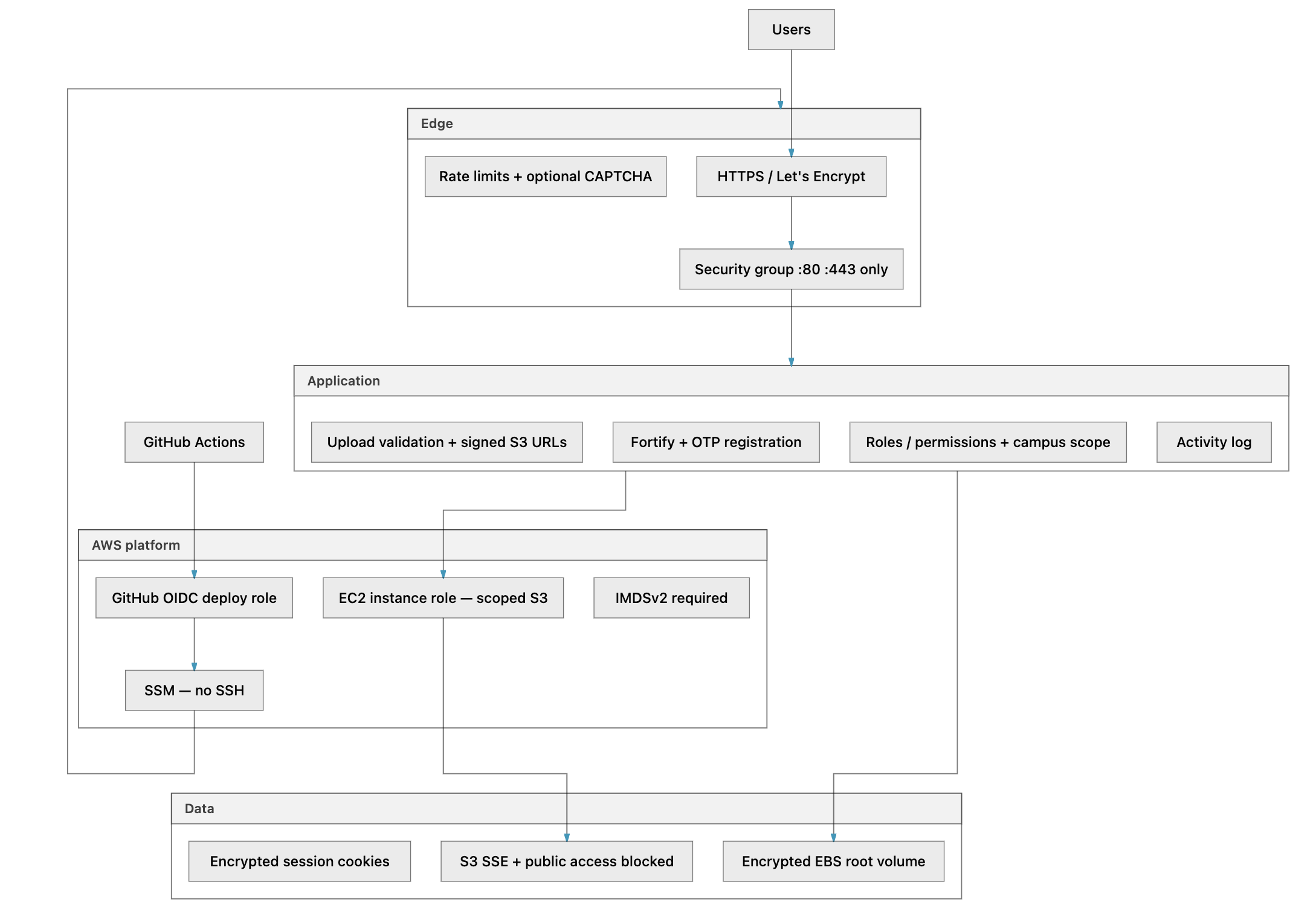
Short answer: For a public Laravel SaaS on a single EC2 instance, this configuration is deliberately hardened in the areas that matter most — network exposure, credentials, storage, deploy pipeline, and admin access. It is not a zero-trust multi-AZ platform and it was not penetration-tested as part of the build; treat this as a configuration review, not a compliance certificate.
What “secure enough” means here: an attacker should not reach MySQL, Redis, or SSH from the internet; CI should not hold long-lived AWS keys; applicant documents should stay private in S3; admin accounts should require 2FA; and every production deploy should pass automated tests first.
Defense in depth (layers)
1. Network perimeter
| Control | Implementation | Why |
|---|---|---|
| Minimal inbound ports | Security group allows only TCP 80 and 443 from configured CIDRs (default: 0.0.0.0/0 for a public web app) |
MySQL, Redis, Docker API, and admin UIs are not reachable from the internet. |
| No SSH (port 22) | No ingress rule for SSH; operators use SSM Session Manager | SSH keys leak via laptops, CI, and authorized_keys; SSM is IAM-audited and requires no open admin port. |
| Internal database network | MySQL and Redis run on the Docker bridge network only — no host port mappings in docker-compose.prod.yml |
Even if someone finds the Elastic IP, they cannot mysql -h … -P 3306 from outside. |
| HTTPS everywhere (after enabling HTTPS) | TLS terminates on nginx; HTTP redirects to HTTPS; certbot renewal cron | Credentials and session cookies must not travel in cleartext after go-live. |
| Optional pre-launch gate | nginx HTTP basic auth via app.htpasswd + URI map (app-auth-map.conf) — can require a shared password on the whole site while piloting; exempts /build/, /robots.txt, avatars |
Lets you test on production URL without making the app world-visible. Remove or disable before public launch. |
| World-reachable web app | Public applicant/staff portal on 443 is intentional | Mitigated by app-layer rate limits, CAPTCHA (configurable), and admin 2FA — not by IP allowlists. |
We use a public subnet instead of private-plus-NAT mainly for cost and simplicity. Security here doesn't come from hiding the server — it comes from exposing only nginx and keeping the data services internal.
2. AWS identity and access (IAM)
Two roles, two jobs — never mixed.
EC2 instance role (runtime)
Attached at launch. Used by the app container for S3 and by the host for ECR pull.
| Permission | Scoped to | Why |
|---|---|---|
ecr:GetAuthorizationToken, ecr:BatchGetImage, … |
ECR registry | Pull new images on deploy — no docker login credentials in files. |
s3:GetObject, s3:PutObject, s3:DeleteObject, s3:ListBucket |
Named uploads + backups buckets only | Applicant files and DB dumps — not s3:* on the account. |
ec2:AssociateAddress, … |
Elastic IP | User-data associates stable IP on boot. |
logs:CreateLogStream, … |
CloudWatch Logs | Optional app/host logging. |
AmazonSSMManagedInstanceCore (managed policy) |
SSM agent | Enables Session Manager without SSH. |
AWS_ACCESS_KEY_ID stays empty in production .env for the same reason as before: static keys on disk are long-lived secrets, while the instance role rotates its credentials automatically and only reaches the named buckets it needs.
GitHub Actions OIDC role (deploy-time only)
| Property | Value | Why |
|---|---|---|
| Trust | repo:acme-corp/laravel-app:environment:production only |
A workflow on a random branch or fork cannot assume the role unless it targets the protected Environment. |
| Permissions | ECR push to one repo + SSM SendCommand on instances tagged Project=myapp |
Compromised CI cannot delete buckets, read all S3, or terminate arbitrary EC2. |
| Credential lifetime | Short-lived STS session (~15 min) | Nothing to rotate in GitHub except the app .env secret. |
| Optional gate | GitHub Environment required reviewers | Human approval before SSM touches production. |
Article #1 includes the trust policy JSON and IAM details.
IMDSv2 (instance metadata)
Launch template sets http_tokens = required and http_put_response_hop_limit = 2.
Why: Without IMDSv2, a server-side request forgery (SSRF) vulnerability in the app could potentially reach the metadata service and steal instance-role credentials. Requiring session-oriented metadata requests is AWS’s recommended mitigation.
3. CI/CD and supply chain
| Control | How | Why |
|---|---|---|
| Test gate | Deploy workflow runs only after CI succeeds on main (workflow_run) |
Broken code should not reach production automatically. |
| Same commit tested and deployed | Deploy checks out workflow_run.head_sha |
The image you ship is the tree PHPUnit exercised. |
| No SSH keys in GitHub | Deploy via SSM Run Command | Keys in secrets rot poorly and grant persistent shell access. |
| No AWS access keys in GitHub | OIDC only | Same reasoning — plus CloudTrail logs AssumeRoleWithWebIdentity. |
| Deploy concurrency lock | concurrency: cancel-in-progress: false |
Prevents overlapping deploys corrupting migrations. |
| Immutable images | ECR tags per git SHA; ECR scan on push enabled in Terraform | Traceability and basic image vulnerability scanning. |
| Secrets not in scripts | deployment/scripts/ contain no hardcoded passwords; production .env comes from GitHub secret or local file |
Scripts are git-tracked — they must not embed secrets. |
| Terraform state protected | Remote state in encrypted S3 + DynamoDB lock; terraform.tfvars and backend.hcl gitignored |
State contains resource IDs and sometimes sensitive outputs. |
| Infra separate from app deploys | terraform apply is manual, not on every merge |
Prevents a feature PR from accidentally changing security groups or IAM. |
What CI/CD does not protect against: vulnerabilities in application code, compromised npm/Composer packages, or a malicious insider with GitHub admin + AWS operator access. Those need code review, dependency updates, and org-level access control.
4. Data protection (at rest and in transit)
S3 (uploads and backups)
| Control | Implementation | Why |
|---|---|---|
| Public access blocked | aws_s3_bucket_public_access_block on all buckets |
Buckets are never world-readable. |
| SSE-S3 (AES-256) | Default encryption on uploads, backups, and tfstate buckets | Baseline at-rest encryption with no key management overhead. |
| Versioning on uploads bucket | Enabled in Terraform | Accidental overwrite or bad deploy can recover previous object versions. |
| Backup lifecycle | Backups transition to Glacier after 90 days | Long-term retention without keeping everything in Standard tier. |
| CORS restricted | allowed_origins = your HTTPS domain only |
Browsers can upload via presigned URLs; random sites cannot use your bucket from JS. |
| Presigned URLs for files | Laravel serves documents via time-limited signed URLs, not public object URLs | Even with a valid app session, object access expires; links are harder to leak permanently. |
Browsers upload straight to S3 mainly to keep large binaries off the app disk and reduce load on PHP-FPM, though CORS and the private bucket policy both have to be configured correctly or uploads fail closed.
EBS and containers
| Control | Implementation | Why |
|---|---|---|
| Encrypted root volume | encrypted = true on EC2 EBS in launch template |
Host disk theft from AWS console still requires KMS/account access. |
Production .env mode 600 |
Deploy script chmod 600 on /opt/myapp/.env |
Other users on the box cannot read DB passwords. |
APP_DEBUG=false in Compose |
Forced in docker-compose.prod.yml environment |
Stack traces must not leak to users in production. |
In transit
| Path | Protection |
|---|---|
| User ↔ nginx | TLS 1.2+ (Let's Encrypt) |
| nginx ↔ PHP-FPM | Internal Docker network |
| App ↔ MySQL/Redis | Internal Docker network |
| App ↔ S3 | HTTPS AWS API |
| CI ↔ AWS | TLS + OIDC |
| Operator ↔ EC2 | SSM over TLS (no VPN required) |
5. Application-layer security (Laravel)
These are configured in production .env and application code — independent of AWS but essential to the overall posture.
| Control | Configuration | Why |
|---|---|---|
| Email OTP before account creation | Registration verifies email before persisting the user with email_verified_at |
Prevents throwaway/unverified accounts from entering the applicant pool. |
| Admin 2FA required | ADMIN_REQUIRES_2FA=true + middleware |
Stolen admin password alone is not enough. |
| Password expiry | PASSWORD_EXPIRES_DAYS=90 (configurable) |
Limits window of compromised password reuse for staff. |
| Encrypted sessions | SESSION_DRIVER=redis, SESSION_ENCRYPT=true |
Session payload unreadable if Redis snapshot leaks. |
| Rate limiting | Fortify login throttling (per email + IP); OTP and auth routes throttled | Slows credential stuffing and OTP brute force. |
| RBAC + scoping | Spatie permissions; campus-scoped data for staff | Admissions staff see only what their role and campus assignment allow. |
| Upload validation | MIME/size checks; document types restricted (e.g. PDF defaults) | Reduces malware upload and storage abuse. |
| Audit log | Spatie activity log (ACTIVITY_LOGGER_ENABLED=true) with scheduled retention |
Admin actions (status changes, settings) are traceable for investigations. |
| GDPR retention jobs | Scheduled enforcement of retention policies | Data minimisation over time — not just “collect forever.” |
| Error monitoring | Sentry for exceptions and log forwarding | Failures visible without reading raw logs on the box. |
| Webhook signature verification | Mail provider webhooks require configured secrets | Prevents forged delivery events. |
| Optional CAPTCHA | Login/registration CAPTCHA toggles in settings | Extra bot friction on public auth endpoints when enabled. |
Both layers matter because a perfect security group does not stop SQL injection or IDOR bugs, and a perfect Laravel app still fails if MySQL is sitting exposed on 0.0.0.0:3306.
6. Operator tooling (locked down by default)
Admin convenience tools are easy to misconfigure. This setup treats them as dangerous optional surfaces.
| Tool | Exposure | Hardening | Why |
|---|---|---|---|
| Dozzle (log UI) | 127.0.0.1:9999 on host only — not on public nginx |
Auth required; DOZZLE_ENABLE_SHELL=false, DOZZLE_ENABLE_ACTIONS=false in production |
Full Docker logs without exposing Docker socket to the internet. Reach via SSM port forward if needed. |
| phpMyAdmin | Subdomain pma.app.example.com via nginx only — no host port |
HTTPS + nginx basic auth (htpasswd on host, not in git) before phpMyAdmin login; do not set PMA_USER (auto-login) |
DB GUI is a high-value target — double gate plus MySQL credentials. |
| Horizon dashboard | /horizon on main app |
Laravel auth + is_admin + permission middleware |
Queue dashboard shows job payloads — admin only. |
phpMyAdmin vulnerabilities show up often enough that nginx basic auth is worth the extra friction — it adds a separate credential layer even if the app itself has a bug.
7. Secrets hygiene
| Secret | Stored where | Never |
|---|---|---|
Production .env (DB, Redis, APP_KEY, SMTP, Sentry, …) |
Local file → GitHub AWS_PRODUCTION_ENV secret → SSM → EC2 chmod 600 |
In git, in blog posts, in Slack |
| Operator AWS credentials | ~/.aws/credentials profile on engineer laptops |
In GitHub Actions |
| GitHub deploy credentials | OIDC — no static keys | N/A |
| S3 access from app | EC2 instance role | Long-lived IAM user keys in .env |
| phpMyAdmin / pre-launch basic auth passwords | docker/nginx/*.htpasswd on host, generated at init |
Committed to repository |
| TLS private keys | certbot volume on EC2 | In git |
Rotate secrets by updating local .env.production.aws, re-pasting the GitHub secret, and redeploying.
8. Backups, recovery, and availability
Security includes recovering from failure, not only blocking attackers.
| Mechanism | Purpose | Security note |
|---|---|---|
| Scheduled DB backups | database:backup via scheduler container |
Dumps copied offsite to S3 backups bucket (BACKUP_OFFSITE_DISK). Enable automatic backups in admin settings and set frequency to daily before go-live — the scheduler respects an admin toggle. |
| Restore drill | Download latest dump → restore to scratch MySQL → verify | A backup never tested is a false comfort. |
| S3 versioning (uploads) | Recover overwritten applicant files | Protects against application bugs and accidental deletes. |
| Terraform + ECR | Rebuild entire infra and redeploy a known image SHA | Host loss ⇒ downtime, but not permanent data loss if backups work. |
| CloudWatch EC2 alarm | Status check failure notification | Availability signal — not intrusion detection. |
Accepted availability risk: One EC2 instance means no automatic failover. Host failure ⇒ downtime until restore on a new instance from Terraform + backups. That is a cost/complexity trade-off, not a confidentiality gap, if backups and restores are proven.
9. Accepted risks and known limits
Be explicit about what this configuration does not guarantee:
| Risk | Severity | Mitigation in place | When to revisit |
|---|---|---|---|
| Single-instance downtime | Availability | Offsite backups, infra as code | Traffic or SLA requires multi-AZ |
| Shared-host resource contention | Availability | Vertical scale (t4g.medium), Horizon tuning |
Sustained CPU/RAM pressure |
| Application vulnerabilities (XSS, IDOR, etc.) | Confidentiality / integrity | Secure coding, tests, Sentry, RBAC | Regular dependency updates, security review |
| Compromised GitHub org admin | Integrity | Environment reviewers, branch protection | Org-level 2FA, least-privilege GitHub roles |
| Insider with AWS operator + SSM | Integrity | IAM audit, activity log | Separate prod access, break-glass only |
| DDoS on :443 | Availability | AWS default; no Shield Advanced | CloudFront + WAF if attacked |
| No WAF / bot management at edge | Abuse | Rate limits, CAPTCHA, 2FA | CloudFront + WAF if abuse grows |
This assessment reflects repository configuration (Terraform, Compose, workflows, Laravel settings). It does not replace a penetration test, SOC 2 audit, or live AWS drift check — run terraform plan periodically and spot-check the live GitHub secret against your hardening baseline.
Before opening to real users
Walk through the security posture once more in plain language. Run terraform plan and expect no surprises. Confirm only ports 80 and 443 are open and that you reach the server through SSM, not SSH. HTTPS should redirect correctly; if you used nginx basic auth while piloting, remove it before a public launch.
Your production .env should have debug off, encrypted sessions, and admin 2FA required — with empty AWS key fields on EC2 because the instance role handles S3. Turn on automatic daily database backups, verify a dump lands in the backups bucket, and restore that dump once so you know recovery works. Exercise upload validation, confirm Sentry sees errors, and merge a test commit to prove CI still gates deploys.
Security verdict
Yes — this is a conscientious production configuration for a single-server Laravel app, provided you close the operational gaps (daily backups, restore drill, remove pre-launch basic auth when going public) and accept single-instance availability limits.
It prioritises least exposure (no DB/SSH on the internet), least credential lifetime (OIDC + instance roles), private data storage (encrypted S3, signed URLs), and gated deploys (CI + optional human approval). Application controls (2FA, RBAC, OTP registration, audit log) carry the rest of the trust boundary inside nginx.
For a deeper cut on deploy credentials and SSM, continue to Article #1.
17. Day-2 operations
| Task | Command / location |
|---|---|
| Deploy new code | Merge to main, or Actions → Deploy Production |
| Infra change | Edit tfvars → terraform plan → terraform apply (separate PR) |
| Shell | aws ssm start-session --target $INSTANCE_ID |
| Logs | docker compose -f docker-compose.prod.yml logs -f app |
| Rollback app | Deploy older SHA still in ECR (APP_VERSION=<sha> ./deploy-app.sh) |
| Scale for traffic | ec2_instance_type → t4g.medium, HORIZON_MAX_PROCESSES=10, terraform apply, redeploy — see section 2, Handling application load |
| Scale down off-season | Reverse to t4g.small, HORIZON_MAX_PROCESSES=3; optionally stop EC2 |
| Rotate secrets | Edit local .env.production.aws, update GitHub secret, redeploy |
CI/CD does not: run Terraform, renew certs (host cron does), or maintain a staging database.
18. What we skipped and why
Every production stack is a bundle of omissions. We did not skip these because they are bad ideas — we skipped them because they solve problems we did not have yet, at a price and complexity we did not need.
| Skipped | What we use instead | Why it was acceptable |
|---|---|---|
| Staging environment | CI on SQLite + smoke tests on production test accounts | Small team, seasonal traffic; cost of a second box not justified until intake volume grew |
| Separate frontend pipeline | Vite built inside the Dockerfile | One artifact, one deploy — no split JS release train |
| SSH from CI | SSM Run Command + OIDC | No long-lived keys; IAM-audited exec |
| RDS / ElastiCache | MySQL and Redis in Compose | Backups to S3; vertical scale before managed services |
| NAT Gateway | Public subnet EC2 + security groups | MySQL/Redis never expose host ports; see section 19 for the dollar impact |
| ALB / ACM | nginx + Let's Encrypt on the box | Single server — no load balancer to pay for or debug |
The deploy pattern is portable. If you outgrow one box, keep ECR + OIDC + SSM and change what sits behind them — RDS, an ALB, a second instance — not the CI/CD contract.
19. What this stack costs (and what we avoid paying for)
Cost was a design input, not an afterthought. The brief was realistic production quality — HTTPS, private uploads, gated deploys, off-site backups — on a bill that still makes sense when the app is quiet for eleven months of the year.
All figures below are approximate USD in eu-west-1. They assume a fictional admissions-style app: moderate document uploads, one intake spike per year, and a team small enough that GitHub Actions stays within free-tier minutes. Your line items will shift with region, retention policy, and how aggressively applicants upload PDFs.
The seasonal bill, in plain terms
Most months look like ~$36. The intake month looks like ~$79 if you bump to t4g.medium and traffic rises. Over a typical year — eleven quiet months plus one peak — that lands around ~$470/year on AWS alone, before your own time.
That rhythm matters. A stack that costs $150 every month whether or not anyone applies is the wrong shape for seasonal work. This one scales down as easily as up: smaller instance type, fewer Horizon workers, and optionally stopping EC2 entirely off-season (compute drops to zero; the Elastic IP still costs a few dollars while reserved).
Line items we pay
| Service | Off-season | Intake month | Notes |
|---|---|---|---|
EC2 t4g.small |
~$15 | — | Graviton ARM; 2 vCPU, 2 GiB RAM |
EC2 t4g.medium |
— | ~$30 | Doubled RAM for deadline traffic |
| EBS | ~$5 | ~$8 | ~50 GB quiet; ~80 GB when the disk fills |
| Elastic IP | ~$0* | ~$0* | *No charge while attached to a running instance |
| S3 | ~$5 | ~$15 | Uploads, backups, Terraform state |
| ECR | ~$1 | ~$1 | Retain last 10 images |
| Route 53 (optional) | ~$1 | ~$1 | Hosted zone + A record |
| Data transfer | ~$5 | ~$20 | Livewire/HTML egress during peak |
| Monthly total | ~$36 | ~$79 |
Effectively free at this scale: SSM Run Command and Session Manager, IAM and GitHub OIDC, DynamoDB state locking (cents on on-demand), basic CloudWatch alarms, Let's Encrypt. No CodePipeline, no Fargate control plane, no paid runner fleet unless you outgrow GitHub's included minutes.
What a “textbook” AWS stack would add
Consulting blogs and AWS reference architectures often assume private subnets, managed data stores, and a load balancer in front of the app. For the same Laravel workload, that commonly means:
| If you added… | Rough monthly extra | What you buy |
|---|---|---|
| NAT Gateway | ~$35+ | Private subnet egress; we use a public subnet + SG rules instead |
| ALB + ACM | ~$20 | Multi-instance routing; we use nginx on the box |
| RDS MySQL (smallest useful tier) | ~$25–35 | Managed DB, automated backups, failover options |
| ElastiCache Redis | ~$12–15 | Isolated cache/queue memory |
| ECS/Fargate (equivalent work) | ~$30–80+ | Orchestration we replace with Compose |
Stack those avoided services on top of a single app server and you are often at ~$130–150/month before traffic — about four times the off-season bill here, for capabilities we deliberately deferred.
That comparison is not apples to apples. RDS and an ALB genuinely buy managed patching, connection pooling, health-checked failover, and a path to horizontal scale. We traded that for one host to understand, one invoice line to watch, and a deploy script that fits in a repo. Section 23 explains when that trade stops being worth it.
Where costs creep (and how we slow them)
Compute dominates. Graviton (t4g) runs roughly 20% cheaper than comparable x86 (t3) for the same vCPU count — worth it because CI must build linux/arm64 anyway. The seasonal playbook in section 2 is also a cost playbook: t4g.medium only when intake demands it.
Storage drifts upward silently. EBS grows with MySQL and logs; S3 grows with every applicant document and every nightly dump kept forever. Lifecycle rules — for example, Glacier for backups older than 90 days — prevent the backups bucket from becoming an annuity.
Egress is why uploads go browser → S3 via presigned URLs. Bytes that never touch PHP never hit FPM memory or outbound bandwidth on the app path.
Operator time is the saving spreadsheets miss. No NAT route tables, no Fargate service events, no “why is the task pending?” threads. For a two-person team, hours not spent babysitting infrastructure often matter more than the ~$90/month gap between this stack and a minimal “enterprise” VPC.
When to spend more
Section 23 lists engineering improvements in priority order. As a rule of thumb: add ~$36/month for a staging box when SQLite CI has lied once too often; add ~$25–35/month for RDS when host failure stops being an acceptable outage mode; add ~$20/month for an ALB when you have a second app server, not before. Edge caching and WAF are traffic- and abuse-dependent — budget when nginx rate limits stop being enough, not preemptively.
If the app is seasonal, the team is small, and occasional maintenance downtime is acceptable, ~$36/month off-season is a fair price for a real Laravel production platform on AWS — not a toy, and not a bill that punishes you for being quiet.
20. Troubleshooting
When something breaks, start from the symptom — not from re-running random commands. Most failures in this stack fall into a small set: Terraform state/credentials, OIDC trust mismatch, SSM payload encoding, or Docker/Compose on the host.
| Symptom | Likely cause | Fix |
|---|---|---|
terraform init fails |
Bad backend.hcl or credentials |
Re-run the foundation script; source aws.env |
SSM PingStatus not Online |
Agent not started, wrong subnet | Wait 5 min; check instance profile |
AssumeRoleWithWebIdentity denied |
OIDC trust mismatch | github_repository + Environment name must match tfvars and workflow |
| ECR push denied | Wrong ECR_REPO variable |
Match terraform output ecr_repository_url |
SSM AccessDenied on instance |
Missing Project tag |
Terraform sets tag from project_name; verify EC2_INSTANCE_ID |
| Garbled SSM output | Base64 newlines | tr -d '\n' on all payloads |
| Deploy green, no migration | stdin consumed by compose exec |
Post-pull script as file; exec -T < /dev/null |
| 502 after deploy | App not healthy | docker compose logs app; nginx -t |
| Uploads fail in browser | S3 CORS | allowed_origins must include https://app.example.com |
| HTTPS broken after deploy | TLS overwrite | Confirm deploy script TLS preservation branch |
| CI passes, no deploy | workflow_run filter |
CI must succeed on main; check branch name |
21. Series map
| # | Article | Use when… |
|---|---|---|
| 0 | This walkthrough | Reproducing the full pipeline |
| 1 | OIDC + ECR + SSM deep dive | Debugging GitHub → AWS auth and SSM payloads |
| 2 | One EC2 Compose stack | Understanding host/runtime trade-offs |
| 3 | arm64 builds on GHA | Slow CI builds, QEMU, cache |
| 4 | workflow_run gate |
CI/deploy ordering |
| 5 | Production deploy bugs | War stories: base64, stdin, volumes |
22. Takeaways
Build order. Bootstrap remote state, apply the platform stack once, prepare a private .env with Compose hostnames and empty AWS keys for S3, then manual-deploy with the same scripts CI will use. Wire GitHub only after DNS and HTTPS work. Never mix infra changes and app deploys in one step.
Security. Layer it: network perimeter, IAM, encrypted storage, CI gates, and Laravel-level hardening like 2FA, RBAC, and the audit log. Section 16 has the full treatment, and it's framed as a configuration review rather than a compliance certificate.
Cost. Design for the quiet months, not the peak. Section 19 has the numbers: roughly $36/month off-season, $79 during intake, and around $470/year if you scale up for one deadline and back down again. Most of that saving comes from services you simply don't run (NAT, ALB, RDS, ElastiCache, ECS), not from skipping backups or HTTPS.
What "professional" means in this context is closer to boring than impressive: a test gate, immutable images, auditable deploys, and bounded IAM, all without Kubernetes.
23. What could be done better
None of this is a failure audit. The stack shipped, it runs production traffic, and the bill matches the workload. What follows is the order I'd schedule these upgrades in if requirements tightened, and each item ties back to a gap the lean design accepted on purpose rather than missed by accident.
First: close the honesty gaps (~$0–36/month extra)
Staging that mirrors production. SQLite CI is fast but lies about MySQL strict mode, migration edge cases, and S3 upload flows. A second t4g.small with the same Compose file and a separate database — deploy on merge to staging — is the highest-leverage spend after production itself (~$36/month while it runs; see section 19).
Observability beyond “is the box up?” Sentry catches exceptions; a CloudWatch alarm catches a dead instance. What is missing is deploy and runtime context: SSM command failure rate, Horizon queue latency, MySQL slow queries, EBS disk filling during intake. Shipping structured logs off the host — even just Docker → CloudWatch Logs — turns “the site feels slow” into an actionable graph.
Terraform with guardrails. Keeping terraform apply out of app deploys was correct. The missing half is plan-on-PR, required review for infra changes, and periodic drift checks so a console fix during an incident does not become the new source of truth.
Next: reduce deploy fragility (mostly engineering time)
Simpler deploy transport. deploy-app.sh is battle-tested but dense: base64 payloads, stdin traps, Vite volume sync, TLS preservation. A pull-based model on the host — guarded Watchtower, a small webhook receiver, or CodeDeploy — moves that logic out of shell heredocs. SSM was the right v1; it does not have to be v3.
Faster arm64 builds. QEMU on amd64 GitHub runners is correct and slow on cold cache. A self-hosted Graviton runner, or build-on-EC2 after a lightweight CI gate, cuts minutes off every merge.
Finer secrets. One GitHub secret holding the entire .env is simple until you rotate SMTP and republish everything. Parameter Store or Secrets Manager for operator-owned values — referenced at boot — shrinks blast radius without changing the deploy pattern.
When scale or SLA force managed services (~$25–80/month extra each)
RDS (and optionally ElastiCache). Database-on-EC2 is the largest accepted availability risk. RDS buys automated backups, easier restore, and a path off the app host; ElastiCache buys Redis isolation when Horizon and sessions compete for RAM. ECR + OIDC + SSM stay the same — only connection strings and security groups change.
CloudFront + WAF. nginx and Laravel rate limits suffice until they do not. A CDN/WAF in front of the Elastic IP adds bot filtering, geo rules, and DDoS headroom without rewriting the app — cost scales with traffic (section 19).
Zero-downtime and horizontal scale. Container restarts during deploy mean brief 502s — tolerable on one node, unacceptable on a hard SLA. Blue/green on one box is a tweak; true zero-downtime with multiple app servers implies ALB + shared database, which is the architecture fork described in section 2, not a config change.
What I would not change yet
The core contract — CI proves the commit, OIDC credentials are short-lived, ECR stores immutable SHAs, SSM applies them without SSH — is sound. The improvements sit around it: parity environments, managed data when downtime hurts, less shell in the deploy path, better logs.
Reorder by your constraints. A year-round SaaS with paying customers should probably invert the list: RDS and observability before staging polish. A seasonal portal with a two-person team should probably do staging and logs first, and defer ALB until a second instance is real, not hypothetical.
💬 Comments
No comments yet. Be the first to share your thoughts!
Leave a Comment